

SQL Server 2008 T-SQL Enhancements
 15
15
- Details
Curious to see what kinds of benefits SQL Server 2008 provides for developers? Check out this video tutorial to learn about T-SQL enhancements in SQL Server 2008 including: Row Constructors, Inline Variable Assignment, Compound Assignment Operators, and DML enhancements for the OUTPUT Clause. Likewise, get a sneak peak at the new T-SQL DML MERGE statement and Table-Valued Parameters.
This Video Covers
T-SQL enhancements, variable assignment, parameters, aggregates and summaries, and coding improvements.
Details
Video Length: 09:09
Skill Level: 200 - Intermediate
Series: What's New in SQL Server 2008
Author/Presenter: Michael K. Campbell
Applies to SQL Server: 2008


- Downloads


+ Related Videos
Introducing SQL Server 2008

Get a high-level overview of what's new in SQL Server 2008 for developers, dbas, analysts, and anyone using SQL Server 2008.
Covers: The SQL Server Storage Engine, New Data Types, Data Warehousing Improvements, Integration Services, and SSMS changes.
Skill Level: 000 - Overview
Video Length: 09:47
Release Date: 2008-11-04
SQL Server Management Studio 2008
Learn about new additions and features of SQL Server Management Studio 2008.
Covers: SQL Server Management Studio, Connectivity Changes, and Query Output Options.
Skill Level: 200 - Intermediate
Video Length: 10:42
Release Date: 2008-11-06
Date and Time Data Types in SQL Server 2008

Learn about new SQL Server 2008 data types designed for larger and more precise date and time storage options.
Covers: T-SQL, SQL Server 2008, Date and Time, Data Type Precision, T-SQL Date and Time Functions.
Skill Level: 200 - Intermediate
Video Length: 08:54
Release Date: 2008-11-24
+ Related Resources
SQL Server 2008 Transact-SQL Recipes A Problem-Solution Approach

Pages 46-53 do a great job of covering GROUPING SETS and other Grouping enhancements. Likewise, page 71 covers Row Constructors, and other details covered in this video are also explained as well.
Microsoft Help and Support

Itzik Ben-Gan provides a great overview of new SQL Server 2008 Programability features - some of which coincide with the T-SQL enhancements covered in this video.
SQL Server Pro

Itzik Ben-Gan addresses some of the details behind SQL Server 2008 T-SQL enhancements in two articles:
SQL Server 2008’s T-SQL Features
More SQL Server 2008 T-SQL Improvements
SQL Server Books Online
The following links from Books Online will help provide additional information about the topics covered in this video:
Row Constructors (INSERT syntax)
Inline Variable Assignment (DECLARE syntax)
Compound Operators
Grouping Enhancements
MERGE
Table Valued Parameters
+ Transcript
NOTE: Accompanying timeline provides approximate correspondance only.
00:00
-
-
-
-
00:15
-
-
-
-
00:30
-
-
-
-
00:45
-
-
-
-
01:00
-
-
-
-
01:15
-
-
-
-
01:30
-
-
-
-
01:45
-
-
-
-
02:00
-
-
-
-
02:15
-
-
-
-
02:30
-
-
-
-
02:45
-
-
-
-
03:00
-
-
-
-
03:15
-
-
-
-
03:30
-
-
-
-
03:45
-
-
-
-
04:00
-
-
-
-
04:15
-
-
-
-
04:30
-
-
-
-
04:45
-
-
-
-
05:00
-
-
-
-
05:15
-
-
-
-
05:30
-
-
-
-
05:45
-
-
-
-
06:00
-
-
-
-
06:15
-
-
-
-
06:30
-
-
-
-
06:45
-
-
-
-
07:00
-
-
-
-
07:15
-
-
-
-
07:30
-
-
-
-
07:45
-
-
-
-
08:00
-
-
-
-
08:15
-
-
-
-
08:30
-
-
-
-
08:45
-
-
-
-
09:00
-
-
-
-
09:09
Hello and welcome to another SQL Server Video. My name is Michael Campbell, and in this short SQL Server Video, we're going to take a look at some very simple new changes and improvements to SQL Server 2008 that provide some great improvements to T-SQL coding.
Specifically, in this video we'll be looking at Row Constructors, Inline Variable Assignment, Compound Assignment operators, and Grouping Sets. We'll also briefly talk about some of the great new capabilities added to the OUTPUT clause that makes it even more powerful and useful for very complex operations.
And, in this video, we'll also take a very brief look at Table-Valued Parameters and the new T-SQL MERGE statement. But, since these two changes are significant enough in their own right, subsequent SQL Server Videos will look at these two improvements in more detail.
To get started, let's take a look at T-SQL's new Row Constructors, which are best demonstrated by way of an example. And, in this example, I'm just creating a User Types lookup table for a sample application, and populating it with some stock User Types.
The standard way of accomplishing that is to just fire off multiple, distinct, SQL INSERT statements for each row that you need to INSERT. Though, it is common to see people cheating and using INSERTs based off of SELECT statements and UNIONs as well. I'm lazy and have always liked this UNION approach - even if it does cause a decrease in readability.
But with SQL Server 2008's Row Constructors, it's now much easier to INSERT multiple rows into a table while maintaining readability.
It's important to understand though, that under the covers, when using these new Row Constructors, that the kinds of performance you're going to see are really on par with what you'd get using the UNION SELECT INSERT approach - because, really, all this new feature represents is some syntactical sugar that makes life a bit easier.
So, if you need to insert LARGE numbers of rows, then you'll want to look into the Bulk Copy Program or BCP as it provides better throughput and performance.
Another new T-SQL improvement that you'll probably use a bit more than Row Constructors is T-SQL's new ability to do inline variable assignment. And, if you're familiar with C# or VB.NET development, you'll take to this new feature like a fish to water.
Without this feature, to create and assign a variable, you need to first create, and then, well, assign the variable. Assignment of static values to variables is correctly done by using the SET statement.
Though, in previous versions of SQL Server you could also 'SELECT' a static value into a variable, but database snobs will, correctly, look down on you for doing so. And that's because the use of the SELECT statement in assigning variables is used when you are assigning a dynamically assigned, or SELECT-ED, value to your variable - like so.
With SQL Server 2008 though, it's now possible to do static variable assignment with a single line of code - or inline as it were. So, in cases where we want to see everything greater than a given date, we can do that in a single statement now, instead of in two different lines.
And, while this isn't a huge or sweeping change, once you've used it for a while you'll be hard pressed to work without it, and you'll find that it does help save a bit of time when writing sprocs and so on.
And just as SQL Server 2008 provides some simple improvements that make variable assignment much easier and more terse, it also introduces the notion of compound assignment operators that can make working with your variables that much easier.
So for example, prior to SQL Server 2008 if I wanted to change or modify a variable, I basically had to set it equal to itself and any other value that I wanted added - as in the case of these varchar and int variable assignments.
But with SQL Server 2008, you can now do the same thing in a much more terse fashion.
And, again, while this isn't an earth-shattering improvement, it can help speed up your code - and if you're familiar with C# and VB.NET, you'll likely find this new syntax much more comfortable as well.
And, what's really great about these compound assignment operators is that they apply to a wide variety of data types and operations as well - as you can see here in Books Online.
SQL Server 2008 also introduces a number of T-SQL changes and improvements to the GROUP BY clause - including a new ISO compatible syntax, a new GROUPING SETS operator, and a new GROUPING_ID() function.
The new ISO compliant syntax isn't terribly different from previous versions - which still work, though those previous formats are only supported in SQL Server 2008 for backwards compatibility reasons.
Otherwise, in terms of new capabilities, SQL Server 2005 introduced the CUBE and ROLLUP operators - which provide some great capabilities, as you can see from this very simple example.
With SQL Server 2008 though, we now have much more control over how we'd like data aggregated, or grouped, and can explicitly define grouping configurations, or sets, that really let us get close to approximating some of the functionality that you'd get when working with SQL Server Analysis Services Cubes.
The end result though, is that simple reporting applications can be drastically improved to provide increased business intelligence - by just using T-SQL.
And if these capabilities are something that interest you, you'll want to take a look at the section of Books Online that introduces GROUPING SETS, as it's really well put together and will walk you through a series of great examples that will help you understand how to take advantage of these new features.
Otherwise, another improvement that SQL Server 2008 offers is an additional improvement on something introduced, again, in SQL Server 2005: the OUTPUT clause.
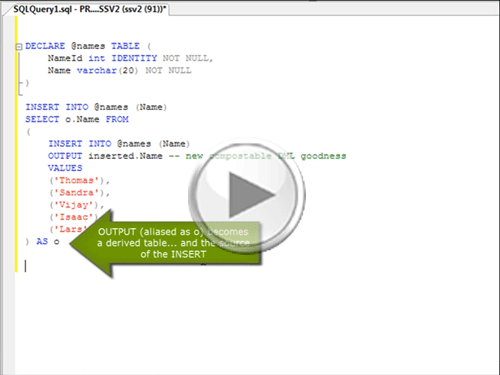
Interestingly enough, this change or addition isn't mentioned in the "What's New" section of SQL Server 2008 Books Online, but if you dig around a bit in the documentation for the OUTPUT clause you'll notice some new improvements that allow the OUTPUT clause to be used within nested DML operations. This, in turn, allows for some pretty powerful options and possibilities that just weren't available before.
For example, notice how, in this example, I'm actually INSERTing 10 rows into my table variable instead of just 5 - because I'm actually redirecting output from my OUTPUT clause back in upon the INSERT statement - in a sort of nested 'feedback loop'. And the cool thing about this is that it's a single, atomic, operation - which you can get an inkling for by looking at the way the results are ordered.
And what's great about these new improvements is that you can now use the OUTPUT clause in any nested DML statement including INSERTs, UPDATEs, DELETEs, as well as the new MERGE statement.
Which, of course, leads us to the MERGE statement - which is another great new T-SQL improvement introduced by SQL Server 2008. And the best way to think of this statement is to think of it as a sort of hybrid between the UPDATE and INSERT statements already found in T-SQL.
In fact, this statement very nicely fits the need that many database developers jokingly call the UPSERT clause.
And in terms of operations, this statement kind of acts like a hybrid between a way to JOIN tables, and then define CASE statements that, in turn, define what to do when data being evaluated is found, or matched, and when it isn't - as you can see from this very simplistic example.
And, while this statement is frequently associated with Extract, Transform, and Load operations - or part of Data Warehouse Management, it can also be useful in OLTP applications as well. So, we'll take a look at this statement in more depth in an upcoming SQL Server Video - where we can examine some of its benefits, and work through a number of examples in more detail.
Finally, one of the coolest new things that SQL Server 2008 introduces is the notion of table valued parameters. And, if you've worked with table variables before, then you'll love table valued parameters as they effectively allow you to use table variables as parameter that can now be passed into sprocs and UDFs - which makes it much easier to process entire collections of data instead of single sets of scalar variables.
Prior to SQL Server 2008, if you wanted to achieve this kind of functionality, you were likely using some sort of hack that passed in serialized values that you could then re-hydrate into arrays and then process as needed.
But with SQL Server 2008, you no longer have to jump through those hoops to take advantage of the ability to process multiple rows of data within a single procedure.
Therefore, in a subsequent video we'll take a look at both how to use Table Valued Parameters from within SQL Server as well as take a high-level look at how to pass arrays of data in from .NET applications to take advantage of this functionality from within applications as well.
So, make sure to check out the other SQL Server Videos in this series to learn more, and to stay abreast of new releases, make sure to sign up for SSV's RSS feed.
Otherwise, thanks for joining and we look forward to seeing you again.
- Comments
Do Not Redistribute
Please do not redistribute this content.
+ I Already Agreed - Stop Bugging Me
Non-Registered users must agree not to distribute each new time that they visit the site (prior to the first download per each visit or session on the site).
Registered users don't have to agree to terms each time they visit the site.
Registration costs nothing, is painless, and is evil-free™. And SQLServerVideos.com will never divulge your personal information to third parties. Ever.
Registered Users
Login Here
+ Terms of Service
By using this site and its resources, you agree to the following terms of use:
Redistribution is prohibited.
Redistribution of videos via any of the following means is prohibited:
• WebServer/HTTP, FTP
• YouTube and similar sites,
• BitTorrent and other P2P technologies,
• CD/DVD, Portable Hard-Drive, etc.
All Rights Reserved.
• SQLServerVideos' Parent Company, OverAchiever Productions, reserves all intellectual rights associated with this site and its content.
• OverAchiever Production reserves the right to prosecute or litigate copyright violations.
• As the copyright owner, OverAchiever Productions will also request information (from Google, YouTube, etc.) about anyone that posts copyrighted SSV
content to a video distribution site.

Thankx
thanks a lot.. v.good one
Excellent. You have made it very neat .Appreciate your work. Thank you for sharing.
please zip all videos for low speed clients
thank you
nice videos i understand sql server topics
Nice videos, Thanks a lot
MzUev1 Hi! I'm just wondering if i can get in touch with you, since you have amazing content, and i'm thinking of running a couple co- projects! email me pls
very very very nice videos
thankx alot
Hi there,
I believe there is an error in the query displayed at 2:38.
DECLARE @value2 int
SELECT @value = -1
I think it should be:
DECLARE @value2 int
SELECT @value2 = -1
^
This explains why the second column of the SELECT statement is NULL. @value2 is never initialized while @value is given a value of -1.
Am I right?
Really very good.
خیلی خوب بود
very very good
babak of "IRAN"
the work is you do is appreciated keep it up!!!
It's great video, it really help guy like me for developer
Nice Article.....
Good One.
Add A Comment