

Ad-hoc Reporting
 17
17
- Details
Need a quick way to export data returned by SQL Queries to a non-technical user, but don't want to have to set up a complex reporting package? In this video tutorial we'll show you how to quickly and easily configure SQL Server Query Analyzer and SQL Server Management Studio to export query results than can be painlessly imported into Microsoft Excel. Use this handy trick to provide co-workers or clients with the adh-hoc data they need - without giving them access to your production servers or without requiring them to learn T-SQL.
This Video Covers
Reporting, Query Output, Query Analyzer, and SQL Server Management Studio.
Details
Video Length: 08:27
Skill Level: 100 - Beginner
Series: Tips and Tricks
Author/Presenter: Michael K. Campbell
Applies to SQL Server: 2000, 2005, and 2008
Tags: Tips and Tricks, Easy, Reporting, and T-SQL


- Downloads


+ Related Videos
Nibbling Deletes

Learn how to execute large numbers of deletes from large tables without negatively impacting concurrent write operations.
Covers: The SQL Server Storage Engine, and T-SQL tips and tricks.
Skill Level: 300 - Advanced
Video Length: 09:19
Release Date: 2008-09-24
Extra-Wide Covering Indexes
Learn how to overcome the 900 byte limit for indexes in SQL Server.
Covers: Indexes, the SQL Server Storage Engine, and T-SQL tips and tricks.
Skill Level: 400 - Guru
Video Length: 07:55
Release Date: 2008-02-25
Using SQL Server Templates

In this video you'll learn how to use, create, and manage SQL Server Templates.
Covers: Code Reuse, T-SQL, SSMS, Query Analyzer, and Code Management.
Skill Level: 200 - Intermediate
Video Length: 07:09
Release Date: 2008-10-08
+ Transcript
NOTE: Accompanying timeline provides approximate correspondance only.
00:00
-
-
-
-
00:15
-
-
-
-
00:30
-
-
-
-
00:45
-
-
-
-
01:00
-
-
-
-
01:15
-
-
-
-
01:30
-
-
-
-
01:45
-
-
-
-
02:00
-
-
-
-
02:15
-
-
-
-
02:30
-
-
-
-
02:45
-
-
-
-
03:00
-
-
-
-
03:15
-
-
-
-
03:30
-
-
-
-
03:45
-
-
-
-
04:00
-
-
-
-
04:15
-
-
-
-
04:30
-
-
-
-
04:45
-
-
-
-
05:00
-
-
-
-
05:15
-
-
-
-
05:30
-
-
-
-
05:45
-
-
-
-
06:00
-
-
-
-
06:15
-
-
-
-
06:30
-
-
-
-
06:45
-
-
-
-
07:00
-
-
-
-
07:15
-
-
-
-
07:30
-
-
-
-
07:45
-
-
-
-
08:00
-
-
-
-
08:15
-
-
-
-
08:27
Hello and Welcome to another SQL Server Video. My name is Michael Campbell and in this video we’ll take a look at a great way to make business data available to non technical users – without forcing them to learn T-SQL, and without requiring the creation of additional reporting infrastructure.
To do this, we’ll start by looking at how to configure both SQL Server Management Studio and SQL Server Query Analyzer. Then we’ll look at exporting the results of a sample query out to a .rpt file – which we can then import into Microsoft Excel.
Here we have an example of an ‘ad-hoc’ query.
As you can see, it’s pretty simple, but will help showcase the process of exporting SQL Server query results to Excel without forcing us to get bogged down in query specifics.
And, if you’re familiar with SQL Server and T-SQL then you know that we can press F-5 and see the results of this query output to a Grid.
But what if we need to expose the results of a query like this to non-technical users such as pointy-haired bosses
or sales people – especially when these users typically aren’t comfortable writing their own T-SQL queries?
Or, more importantly, when these are the kinds of users that we don’t want writing their own queries – especially on a production server.
Happily, in cases like this it’s easy to take advantage of some functionality provided by SQL Server’s native ToolSets – which is the focus of this video.
For those of you still using SQL Server 2000, let’s start by configuring Query Analyzer. Where we’ll begin by selecting the Tools > Options Menu. Then we’ll click on the results Tab.
In here we’ll want to pay attention to how query results are output – and, in this case, we see that the default is to output results to a Grid. But note that we can configure the results to be output to a file – or even to text.
In this case I’m going to leave the default on ‘Results to Grid’ – as that’s my preference, and we can change the output options for each query executed by either using the ‘Query’ Menu or by using hotkeys- which we’ll look at in just a minute. For now though, we’ll want to direct our attention to the next option – the results output format drop-down.
Here’s where we’ll specify how our output is formatted when exported to a flat file. As you can see, we’ve got a number of options, including Comma Separated Values, or Tab Delimited.
Either of these options will work really well, so I’m going to pick Tab Delimited as that just happens to be my preference.
Another key thing that we’ll want to pay attention to here is the “Maximum characters per column’ option – as that, obviously, controls how wide our columns are.
To help speed results over the network, SQL Server’s client tools typically default the column width to 256 characters – which is usually enough for simple queries, but may not be enough for exporting results with your ad-hoc queries.
As such, this value is something that you’ll want to pay attention to whenever you export ad-hoc reports – as you’ll want to make sure to avoid truncation problems. I’m going to go ahead and set the value to 1024 to make things a bit wider (though you can use any arbitrary value that you want, or need). And once I make that change, I’ll go ahead and click OK.
Now, at the top of my query, I’m going to set NOCOUNT ON – as this will stop my query from emitting status information like reports on the number of rows returned and so on.
And that status information represents something that we typically don’t want to be injected into our reports, or exported queries.
Once I do that, I can either hit CTRL+SHIFT+F to force Query Analyzer to save the results of this query to a file, or I can specify where I’d like the output for this query to go using the Query Menu.
Then I can press F5 and I’ll be prompted for a location to save the results. I’ll go ahead and put these results out on my desktop. Note that the file type, or extension, is a .rpt, or Report file. And I’ll go ahead and give this a really creative filename – like “output”. And once I click OK, the results will be output to my desktop.
Configuring SQL Server 2005 or 2008 clients to export results to file takes about the same amount of effort and energy. Once you’ve opened SQL Server Management Studio, connected to a Server, and started a Query, you’ll be able to access the proper menus.
In this case, we’ll use the exact same Tools > Options menu option.
From there, things will vary a tiny bit as we’ll need to click on the Query Results node – and note that we can change the default output here – just as we could with Query Analyzer.
Once we’re there though, we need to click on the Results to Text subnode where we’re able to configure the output format. Again, Comma or Tab Delimited formatting options work well in most cases, but we’ll change things to Tab delimited – to keep our results the same as from the previous example.
We’ll also scroll down to the max character width option, and bump that up to 1024 as before.
Then we’ll go ahead and click OK.
Of course, since SQL Server Management Studio works a bit differently than Query Analyzer (in terms of how it manages connections), we’re warned that the changes we just made won’t take effect until we open a new connection, or query window.
So we’ll dismiss that warning, open up a new query to the Northwind database, and then paste in our query.
Once again, we can either press CTRL+SHIFT+F to force our output to a file , or we can go to the Query > Results menu and make our change that way.
Once we do that, we can press F5, and we’re prompted to save our results. Again, these results will be saved as a .rpt, or Report, file – and I could just dump them to a separate file, or overwrite my current file – but since the data there is already good, I’m just going to go ahead and cancel – as we’ll get the exact same results either way. With our query results saved as a .RPT file, we can go ahead and begin the process of importing.
Before we do that though, let’s take a quick peek at this data in notepad.
As you can see we’ve got a tab-delimited set of data – the exact same data, or results, that we saw in Query Analyzer at the start of this video – but here it’s been output to a flat file and formatted using tabs.
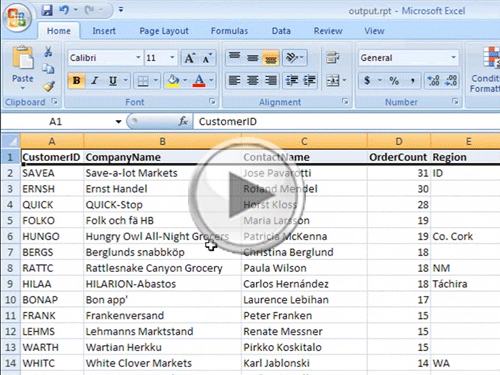
Now, let’s go ahead and look at the import process by starting Excel.
Note that opening Excel first, and then importing the data is typically a much better option than trying to open .rpt files with Excel.
With Excel open, we’ll go ahead and navigate out to the desktop, modify the filter to allow all files – so that we can see the .rpt file, and then select our creatively named file.
Once we do that, Excel starts up the Import Wizard – which makes it super easy to import our results.
For example, we can specify delimiters – such as commas or tabs – which is exactly what we set up, so we’ll use the delimited type, and click Next.
Once we do that, we’ll specify Tab as the option we want to use (though the wizard is smart enough to see that the data was tab formatted). And once we do that, we can play around with a couple of other options if needed, and otherwise we can just click on the Finish button and we’re done.
With the data now in Excel, we can go ahead and beautify it a bit by bolding the first line, and double-clicking on each column to auto-expand it as needed – and then we’re we’ll on our way to having a ready-report for anyone who needs it.
But, if we want to save this as a native Excel file, we’ve got one more tiny hurdle to jump over – which is that we need to let Excel know that we’re okay with converting the data that we just imported into a Native Excel format.
To do this, we just need to follow the prompts when it comes time to save, by clicking NO, and then specifying that we want to save our output in the latest Excel format – which we’ll go ahead and do on our desktop.
At this point we now have an Excel spreadsheet that we can easily hand off to a pointy-haired boss, a sales person, or any other non-technical user – and they can then slice and dice the data as they need it.
And, to help make this ‘report’ a bit easier to manage, we can also paste in the native query used to populate this spreadsheet – as a way to make it easier for us to modify the query down the road, or extend it to meet additional needs or requirements.
And with that, we’re done with this video – thanks for joining us and look forward to seeing you again.
- Comments
Do Not Redistribute
Please do not redistribute this content.
+ I Already Agreed - Stop Bugging Me
Non-Registered users must agree not to distribute each new time that they visit the site (prior to the first download per each visit or session on the site).
Registered users don't have to agree to terms each time they visit the site.
Registration costs nothing, is painless, and is evil-free™. And SQLServerVideos.com will never divulge your personal information to third parties. Ever.
Registered Users
Login Here
+ Terms of Service
By using this site and its resources, you agree to the following terms of use:
Redistribution is prohibited.
Redistribution of videos via any of the following means is prohibited:
• WebServer/HTTP, FTP
• YouTube and similar sites,
• BitTorrent and other P2P technologies,
• CD/DVD, Portable Hard-Drive, etc.
All Rights Reserved.
• SQLServerVideos' Parent Company, OverAchiever Productions, reserves all intellectual rights associated with this site and its content.
• OverAchiever Production reserves the right to prosecute or litigate copyright violations.
• As the copyright owner, OverAchiever Productions will also request information (from Google, YouTube, etc.) about anyone that posts copyrighted SSV
content to a video distribution site.

thanks its a great video
Atleast now i now exporting data to an excel for a start...!!! Thanks.
It is great presentation and very good clarity of the video and I really appreciate for that.
good thing
Unbelievably Outstanding!!!!!!!!!!!!!!!!1
great
Its mind blowing..Thanks for this video
excellent video quality and good presentation.... keep it up...:)
It was shortly and to the point but great! Thanks
excellent , lot of thanks
Thanks for the great video :)
Thanks alot - your answer solved all my problems after several days struglging
thank you.very good
thanks good one
super
awesome
That's what I call an excellent tutorial - addresses the problem of exporting sql data to excel, shows two ways to do it (depending on the user's tools) and throws a few relevant tips in along the way. Two thumbs up!
Add A Comment