

Restoring SQL Server 2000 Databases
 3
3
- Details
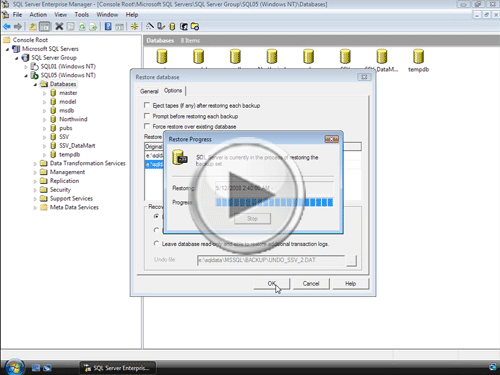
In this how-to video, you'll learn how to test your SQL Server 2000 backups as part of your disaster recovery plan in order to make sure that you can easily recover in the case of an emergency. To accomplish this, you'll learn how to use SQL Server Enterprise Manager in coordination with the MSDB's history tables to easily populate recovery options, and then you'll see how to manually restore databases as well - and learn how to recover should an error or problem happen along the way.
This Video Covers
Backups, Restore and Recovery, Recovery Options, and SQL Server Enterprise Manager.
Details
Video Length: 12:45
Skill Level: 200 - Intermediate
Series: SQL Server Backups
Author/Presenter: Michael K. Campbell
Applies to SQL Server: 2000
Tags: Disaster Recovery, Administration, and Enterprise Manager


- Downloads


+ Related Videos
+ Related Resources
SQL Server 2000 Administrator's Pocket Consultant

Chapter 11 provides some great information on a number of different restoration scenarios that you can use. And, after watching this video, will serve as a great reference tool that can help you create your own disaster recovery plan and documentation.
SQL Server Books Online
The entry for the RESTORE statement in Books Online (for SQL Server 2000) provides some great insight into flexibility - and also provides some examples of different kinds of RESTORE operations.
SQL Server Books Online
Routinely backing up the MSDB database (i.e. log file backups every 15 minutes or so) can help make recovery from a disaster
much easier - as demonstrated in this video. However, the MSDB database isn't set to Full Recovery Mode by default, and even
if you manually set it to FULL (or Bulk Logged) Recovery, there are a few activities that can 'trigger' it to return
to SIMPLE Recovery.
This entry in Books Online helps
discuss those actions, or triggers.
SQL Server Pro

Check out the 'Reality Check' section of this article (written by a REALLY good looking and smart guy) to get a better feeling for how 3rd party log-reader agents work.
+ Transcript
NOTE: Accompanying timeline provides approximate correspondance only.
00:00
-
-
-
-
00:15
-
-
-
-
00:30
-
-
-
-
00:45
-
-
-
-
01:00
-
-
-
-
01:15
-
-
-
-
01:30
-
-
-
-
01:45
-
-
-
-
02:00
-
-
-
-
02:15
-
-
-
-
02:30
-
-
-
-
02:45
-
-
-
-
03:00
-
-
-
-
03:15
-
-
-
-
03:30
-
-
-
-
03:45
-
-
-
-
04:00
-
-
-
-
04:15
-
-
-
-
04:30
-
-
-
-
04:45
-
-
-
-
05:00
-
-
-
-
05:15
-
-
-
-
05:30
-
-
-
-
05:45
-
-
-
-
06:00
-
-
-
-
06:15
-
-
-
-
06:30
-
-
-
-
06:45
-
-
-
-
07:00
-
-
-
-
07:15
-
-
-
-
07:30
-
-
-
-
07:45
-
-
-
-
08:00
-
-
-
-
08:15
-
-
-
-
08:30
-
-
-
-
08:45
-
-
-
-
09:00
-
-
-
-
09:15
-
-
-
-
09:30
-
-
-
-
09:45
-
-
-
-
10:00
-
-
-
-
10:15
-
-
-
-
10:30
-
-
-
-
10:45
-
-
-
-
11:00
-
-
-
-
11:15
-
-
-
-
11:30
-
-
-
-
11:45
-
-
-
-
12:00
-
-
-
-
12:15
-
-
-
-
12:30
-
-
-
-
12:45
Hello and welcome to another SQL Server Video. My name is Michael Campbell, and in this video we’re going to take a look at restoring and recovering SQL Server 2000 databases using SQL Server Enterprise Manager.
And when it comes to recovering databases, there are basically two use-cases describing how or why you’ll be restoring. The first is as part of a disaster recovery plan – meaning that you’re either testing your backups or actively restoring one after a critical failure.
The second use-case where you might be restoring a database is when you’re trying to move a database, or copy it from one machine or business to another. And in these cases there are a lot of things to pay attention to, such as server settings, server and database versions, user accounts and so on. Accordingly, in this video we’ll be focusing on the first use case – so if you’re interested in copying or moving databases then you’ll want to check out the SQL Server Video Series on copying and moving databases.
Otherwise, in this video, we’ll start by looking at basic restoration and recovery options before looking at some of the more complex things that you’ll typically need to address when recovering during an actual disaster recovery scenario.
To get started, we’ll go ahead and fire up SQL Server Enterprise Manager where we can start restoring a database by right clicking on the databases node, expanding the ‘all tasks’ node, and then selecting the restore database context menu option.
At this point the Restore database dialog launches and the first thing to notice is that we need to specify what the name of the database will be that we’re restoring. And, as you can see, we can select the name from the dropdown, or type in a name manually. If we select the name of a database that’s already in use, then our restore operation will attempt to restore right over the top of the selected database. But happily, as we’ll see in a second, you need to explicitly allow that kind of behavior – in order to prevent yourself from accidentally shooting yourself in the foot.
In the video SQL Server Backup Best Practices, we covered how a key part of any viable disaster recovery plan involves routinely checking, or verifying, that you can recover your databases by routinely checking your backups. Therefore, in this video, we’ll pretend that that’s what we’re doing, so we’ll specify the name of SSV_2 – meaning that we’ll be creating a copy of our database with this restore operation.
With that taken care of, we now need to specify a backup source that we can use as part of our recovery operation. And, as you can see, there are three options. I n the majority of cases, the first option – to restore a database, will be what you’ll want to use.
And if we select that option, we then need to tell SQL Server which database backups to use – which we do by selecting the database in question from the dropdown.
The thing to note, however, is that only databases that have been backed up will be listed in this dropdown. And that’s because each time you perform a backup via a regularly scheduled backup routine or maintenance plan, SQL Server squirrels away information about the backup to the msdb database and keeps track of key details, such as the filename where the backup was stored, when it was made, Log Sequence Numbers, and so on.
And, by using this data, SQL Server Enterprise Manager is able to make database restore operations tons easier by logically linking and grouping full backups and dependant differential and log file backups into an easy-to-use UI.
Most of the time when you’re validating or testing, you’ll want to restore the most recent full-backup, along with any log file backups that you have available since that full backup.
However, if you’re recovering from an actual disaster, then you’ll usually want to apply any transaction records in your log since the last log file backup.
To do this, you’ll actually want to start your restore operation by backing up the tail end of your transaction log without truncating it – as you don’t want to risk losing any of the information in your log file when recovering from a disaster.
Therefore, you’ll want to perform a Transaction log backup – where you make sure that you don’t Remove the inactive portion of your log.
Then, if we restart our restore operation, reselect our DB, and then scroll down to the bottom of the list of available backups, we’ll see a new entry in place – representing the tail end of our log.
And what this means is that we can now restore and then recover our database up to the last completed transaction listed in the transaction log. In this way, any operations that were still ongoing when we backed up the log will be rolled back, and everything else will be rolled forward.
And what’s great about this, is that if you’re recovering from an actual crash, you’ll be able to recover virtually everything that happened up to the point of the crash if you can salvage and use the tail of your log.
And it’s worth noting that if you don’t want to go all the way up to the most recent transaction log backup – you’ve got a couple of options. For starters, you can just uncheck transaction logs back to roughly the point in time where you want to restore. And, with this approach, any transactions completed at the end of the last log that you restore will be recovered, or played forward, and any incomplete transactions will be rolled back.
However, in cases where a ‘stupid user error’ wipes out some data and you’ve got a really good feel for when that was – you can recover to a point-in time by using the ‘point in time’ option and configuring it as needed.
The problem with this approach though, is that while it stops the recovery process right at the time specified and does give you a chance to recover your db to the point in time before a big bad problem, any changes made to your database after that point, are obviously not picked up.
Accordingly, in complex environments or heavily used databases, if you need to use this option, you’ll frequently use it to create a copy of the database up to the point right before the problem, and then spend some painful time trying to copy non-tainted data out of your copied database into the main database, and then dealing with all of the legitimate changes that happened after your data was messed up.
And this complexity is why 3rd party log reader solutions do so well – because most of them give you the ability to analyze your log files, mark transactions that were destructive, and basically tweak everything to the point where it looks like those operations never happened – while any subsequent, and valid, operations took place normally.
In our case though, we’re just looking at testing our backups, so we’ll go ahead and select everything.
On the Options page, there are a couple of options we’ll want to pay attention to up near the top of the dialog – which are all pretty self explanatory. The big one to watch out for though is the bottom option – which you’ll need to check if you’re trying to overwrite an existing database.
In the middle of the dialog, we can also change paths to any database files if we want – and what’s really nice is that the original file names are pulled out of the backup media, and then SQL Server Enterprise Manager will automatically change those file names for us – based on the name of our database – meaning that we don’t have to change these file names manually, unless we want to.
Otherwise, the key thing to pay attention to when restoring a database is whether or not you want it to be recovered as well. Typically that’s exactly what you’ll want – and we’ll look at this option a bit more in just a minute.
For now though, we’ll go ahead and click OK, at which point SQL Server will then do 3 things:
First it will restore our database media from the full backup that we selected.
Then it will apply each of the transaction log backups, in order, until they’ve all been applied.
Finally, with all of the specified transaction log backups applied, SQL Server will then go ahead and RECOVER the database.
And to get a better sense of what’s going on, let’s go ahead and do another restore of our database – this time taking a more manual approach.
And before we go further, let’s look at this middle option – which lets us restore a single file of filegroup from a full backup. This option is relatively advanced – and therefore isn’t used very much – but it’s a good option to know about, especially when you’re working with really large databases.
Otherwise, let’s look at the third, ‘from device’, option which requires us to manually select a full backup and then any subsequent transaction logs – instead of letting us rely on the MSDB’s history tables to pre-populate the sequence of files to restore.
Doing this isn’t too hard – as long as you know where your backups are located. What stinks though is that for every differential backup, or transaction log backup, that you wish to apply on top of your backup, you’ll need to handle manually as well.
Then, for each backup you restore – including the full backup, you need to make sure that you don’t RECOVER the database, because once you do, you can’t apply an additional transaction logs. Therefore, you’ll want to leave the database non-operational.
But the key thing to note is that you have to keep manually walking through this process, over and over, for each additional backup that you wish to apply.
And, along the way, you need to make sure that you don’t get your files, or backups out of order, and you also need to make sure that you don’t accidently ‘RECOVER’ your database – because once you do, any uncompleted transaction logs at the end of the last log file you’ve restored will be rolled back, and everything else will be rolled forward and the database will then be recovered, and open for business.
When we restored this same database earlier – using the history data from the msdb database, SQL Server took this exact same approach: applying each transaction log backup WITH NORECOVERY, and then finally issuing a WITH RECOVERY command on the final file applied.
Which begs the question – why would you want to go through all the difficulty of trying this manually?
Well, in the first case, taking the manual approach isn’t that hard when you’re just trying to create a copy of one of your databases for development or testing purposes as you don’t need to walk through all of the transaction logs – so it’s a great option to be familiar with.
On the other hand, if your server crashes and you’ve had to either rebuild from scratch or lost your msdb database, you won’t have all of that history to help you along. In which case, you’ll be doing everything manually.
Therefore knowing how to do this is beneficial. Even more beneficial, however, is switching your msdb database to full recovery, and routinely backing it up – as doing so can make life much easier for you in the case of a disaster by allowing you to restore the msdb database before trying to restore your user databases.
Now, with those thoughts in mind, let’s go ahead and review one ‘nightmare scenario’ that you might encounter while restoring your databases in the case of an actual disaster. And we’ll do this by failing to restore any additional log files – and as such, we’ll leave the database non-operational.
Then we can refresh the databases node, and note that our database is ‘Loading’ – meaning that it’s kind of in limbo.
And let’s assume for a minute that you were in the process of recovering from a disaster and had… 15 log file backups that you had attempted to apply, and on the 11th one, SQL Server either couldn’t read the file or it had become corrupt.
In a case like that, the restore operation will fail, and your database will be left in the state that it’s currently in – non-usable, and ‘recovering’.
Without third party log-reader tools, there’s not much you can do in a case like this – and any log files after the first failed log file are basically lost – meaning that you lose any changes that they contain.
With a third party log file solution though, it may be possible to recover the database and then try scouring any additional log file backups for transactions that can be played forward. And in a case like that, what you’ll want to do is recover your database while keeping access restricted so that you can try to salvage more data.
And to do that, you can just fire up a new query, and manually execute a backup command that initiates a RECOVERY operation, like so.
And what’s great about this statement is that it’s a RESTORE operation – but it doesn’t require you to specify any media. Instead, all it does is initiate the RECOVERY process.
Likewise, with the RESTRICTED_USER option, you’re also restricting access to the database, which will allow you to get in and validate data, and try to recover any additional data if possible – in the case of a truly ‘nightmare’ disaster recovery scenario.
Then, once you’re done either validating data or trying to recover any additional, potentially lost data, you can just right-click on the database, select the options tab, and uncheck the appropriate access restrictions in order to return the database back to full-access when you’re ready to release it for use.
And now that you’ve seen how to address a couple of different restoration scenarios, I’d strongly recommend ensuring that your msdb database is backed up, and I’d recommend that you start testing your own backups right away to help ‘cement’ what you’ve learned as well as to validate that your backups are working correctly.
Otherwise, we’re done with this video – thanks for joining, and we look forward to seeing you in subsequent SQL Server Videos.
- Comments
Do Not Redistribute
Please do not redistribute this content.
+ I Already Agreed - Stop Bugging Me
Non-Registered users must agree not to distribute each new time that they visit the site (prior to the first download per each visit or session on the site).
Registered users don't have to agree to terms each time they visit the site.
Registration costs nothing, is painless, and is evil-free™. And SQLServerVideos.com will never divulge your personal information to third parties. Ever.
Registered Users
Login Here
+ Terms of Service
By using this site and its resources, you agree to the following terms of use:
Redistribution is prohibited.
Redistribution of videos via any of the following means is prohibited:
• WebServer/HTTP, FTP
• YouTube and similar sites,
• BitTorrent and other P2P technologies,
• CD/DVD, Portable Hard-Drive, etc.
All Rights Reserved.
• SQLServerVideos' Parent Company, OverAchiever Productions, reserves all intellectual rights associated with this site and its content.
• OverAchiever Production reserves the right to prosecute or litigate copyright violations.
• As the copyright owner, OverAchiever Productions will also request information (from Google, YouTube, etc.) about anyone that posts copyrighted SSV
content to a video distribution site.

It is really great work and great help by putting these videos on the site. Thanks a lot all of the team who are maintaing this site. The good feature of this site are download is so fast and it is availabe in different resolution. Keep doing good work.
Midhat
excellent down load speed in different resolution
This info is the cat's paamjas!
Add A Comment