

Shrinking SQL Server Log Files
 3
3
- Details
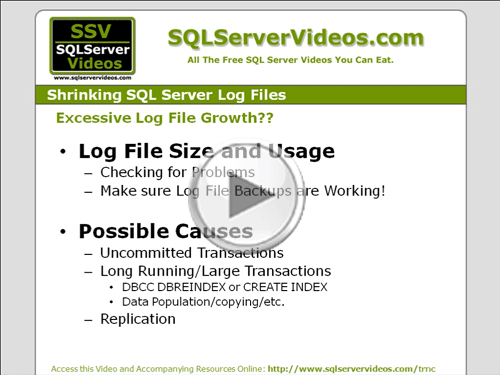
Need to Shrink your Database Log files? Plenty of tutorials online will show you how to trash your log file while implementing a hack. This video will show you what's really going on with your log files, and will help you troubleshoot the real source of your problems instead of telling you to just use TRUNCATE_ONLY on your log files.
This Video Covers
Log Files, Transactions, the SQL Server Storage Engine, and Backups.
Details
Video Length: 11:45
Skill Level: 300 - Advanced
Series: SQL Server Backups
Author/Presenter: Michael K. Campbell
Applies to SQL Server: 2000, 2005, and 2008
Tags: Disaster Recovery, Best Practices, Administration, Log Files, and Transactions


- Downloads


+ Related Videos
SQL Server Backups Demystified
Learn why SQL Server Backups can be hard to understand and master. A must-see video for anyone who isn't familiar with SQL Server Backup functionality.
Covers: Backups, Recovery, Log Files, Transactions, and the SQL Server Storage Engine.
Skill Level: 000 - Overview
Video Length: 11:09
Release Date: 2008-01-03
Understanding Backup Options
Learn about backup types, execution options, storage locations, and other options in order to best address your backup and recovery needs.
Covers: Backups, Recovery, Log Files, Storage Engine, and the SQL Server File System.
Skill Level: 000 - Overview
Video Length: 12:46
Release Date: 2008-01-03
SQL Server Logging Essentials

Take an in-depth look at SQL Server's use of the transaction log and see how write-ahead logging benefits performance, reliability, and data recovery.
Covers: Log Files, Recovery, Backups, the SQL Server Storage Engine, and Transactions.
Skill Level: 000 - Overview
Video Length: 14:15
Release Date: 2008-07-09
+ Related Resources
Inside Microsoft SQL Server 2005: The Storage Engine

Chapter 5 has great, in-depth, information on logging and recovery, and covers log-file growth, the check-point process, and information about virtual log files. See pages 92-93 for information about database and log files. Page 99 has some great information on DBCC SHRINKFILE.
Inside Microsoft SQL Server 2000

Chapter 5 (starting around page 175) provides some great information on database file sizes and growth - as well as information on shrinking files. Pages 182+ cover information about logging mechanics and truncation as well as the role of virtual log files.
Microsoft SQL Server 2005 Administrator's Pocket Consultant

Page 165 provides very rudimentary information on database file types - including log files. The rest of the same chapter covers database management concepts (including information on managing and sizing log files (pages 189 - 194)).
SQL Server Books Online
Check out documentation for the following T-SQL and objects used in this video:
SQL Server 2000
CHECKPOINT
DBCC OPENTRAN
DBCC INPUTBUFFER
sysprocesses pseudo-table
DBCC SHRINKFILE
SQL Server 2005 /2008
CHECKPOINT
DBCC OPENTRAN
DBCC INPUTBUFFER
sysprocesses pseudo-table
sysdatabases DMV
DBCC SHRINKFILE
Kalen Delany's Blog

In a great blog post, Kalen points out that sysprocesses does a better job of tracking-down orphaned transactions than other DMVs in SQL Server 2005.
Microsoft Help and Support

SQLSkills.com

Paul S. Randal has a great blog post outlining causes for heavy log file usage: What can cause log reads and other transaction log questions.
+ Transcript
NOTE: Accompanying timeline provides approximate correspondance only.
00:00
-
-
-
-
00:15
-
-
-
-
00:30
-
-
-
-
00:45
-
-
-
-
01:00
-
-
-
-
01:15
-
-
-
-
01:30
-
-
-
-
01:45
-
-
-
-
02:00
-
-
-
-
02:15
-
-
-
-
02:30
-
-
-
-
02:45
-
-
-
-
03:00
-
-
-
-
03:15
-
-
-
-
03:30
-
-
-
-
03:45
-
-
-
-
04:00
-
-
-
-
04:15
-
-
-
-
04:30
-
-
-
-
04:45
-
-
-
-
05:00
-
-
-
-
05:15
-
-
-
-
05:30
-
-
-
-
05:45
-
-
-
-
06:00
-
-
-
-
06:15
-
-
-
-
06:30
-
-
-
-
06:45
-
-
-
-
07:00
-
-
-
-
07:15
-
-
-
-
07:30
-
-
-
-
07:45
-
-
-
-
08:00
-
-
-
-
08:15
-
-
-
-
08:30
-
-
-
-
08:45
-
-
-
-
09:00
-
-
-
-
09:15
-
-
-
-
09:30
-
-
-
-
09:45
-
-
-
-
10:00
-
-
-
-
10:15
-
-
-
-
10:30
-
-
-
-
10:45
-
-
-
-
11:00
-
-
-
-
11:15
-
-
-
-
11:30
-
-
-
-
11:45
Hello and Welcome to another SQL Server Video. My name is Michael Campbell and in this video we’ll take a look at shrinking SQL Server Log Files and troubleshooting problems with excessive growth.
In previous videos within this series, we looked at logging essentials, and covered how to manage sizing and growth options for SQL Server databases. But we didn’t address how to decrease log file sizes or address issues where they might get a bit too large.
Therefore, in this video, we’ll look at troubleshooting some of the common causes for ‘excessive’ growth and then conclude by looking at how to return log file space back to the operating system when needed.
In the video “SQL Server Logging Essentials” we covered how SQL Server manages log file space through the use of Virtual Log Files, or VLFs, in conjunction with the Checkpoint process – that is designed to free-up log file space for reuse during normal operations.
However, one key thing to note about the checkpoint process is that it’s not able to interact with transactions that are newer than the oldest, currently active, transaction. Therefore, if automatic checkpoints are happening, say… every minute or so… on a moderately used database, you’ll only have a minute or two’s worth of active log file space. But if an operation, or transaction, starts to run for say… 15 minutes, then the log file is going to have at least 15 minutes worth of transactions in it.
Therefore, long running, or problematic, transactions can easily lead to excessive log growth as SQL Server may need to start acquiring more and more disk space to keep logging other, concurrent, operations while a long-running (or stalled) transaction is being waited upon in the background.
The question though, is how can you tell if a spike in the size of your log file is due to a stalled or orphaned transaction instead of just being caused by an overall increase in activity?
To tell the difference, you’ll need to start by looking at how much of the currently allocated log space is being used. If only a fraction is being used, then it’s likely that whatever caused the growth has completed, and you can think about resizing the log file as needed.
And, as we covered in previous videos on managing log file growth, you can use either the taskpad view in SQL Server Enterprise Manager to view usage in a GUI. Or, with SQL Server 2005 and 2008 databases, you can use Disk Usage Reports from within SQL Server Management Studio.
But a non-GUI way to see these values is just to use the SQLPERF command.
And, with SQL Server 2005 and 2008, you can also get a very quick feel for what SQL Server is waiting on by merely asking it – when you query the sys.databases system catalog and looking at the results for the log_reuse_wait_description column.
Otherwise, a key thing to do is to make sure that your log file backups are running – and if there’s a huge spike in the size of recent backups, then that’s likely indicative of heavy activity. But if the job has stopped, or errored-out, that could be the source of your problem.
Therefore, if you think (or know) that you have a problem, there are a number of techniques you can use to look into troubleshooting what may be going on.
As mentioned already, one of the primary culprits for this kind of unexpected growth can be uncommitted, or stalled transactions, as well as long-running operations or larger transactions that require a long time to execute – and which typically make numerous modifications.
If you’re dealing with a replicated database, it’s possible that problems with the log reader agent might be causing excessive file growth as well.
There are also a couple of other, much more exotic, potential causes but we’ll start by looking at the more probably possibilities first.
In SQL Server, EVERY time you make a change to data, your change is wrapped in a transaction. In this way, even if you don’t wrap your own queries in an explicit transaction, SQL Server still wraps the operation in what is known as an implicit transaction – which allows SQL Server to undo the operation if something bad happens along the way.
It’s also possible to wrap operations in explicit transactions – which gives you much more flexibility and control over which operations need to complete together, or as a unit. It’s even possible to nest transactions within each other to provide additional rollback protection when executing more advanced operations. But with this extra ‘power’ also comes the slightly increased possibility that developers might shoot themselves in the foot.
Likewise, if developers aren’t careful, they can create applications that let end-users work with a table, and then head out to lunch – leaving the entire table locked – like what you’re seeing in this example – where the query on the right has an open transaction that is blocking the execution of the query on the left. And, in this case, the query on the left can’t complete until the query on the right is either completed, or rolled back.
In most cases, you’ll typically know about this kind of problem because other requests for the resource will be blocked.
But in cases where a user is working with a rarely used table… you’re going to see their open transaction stalling the checkpoint process’ ability to reclaim log space. Consequently, the log file is going to start to grow.
Nested transactions can also be a culprit – especially if they’re executed through very complex processing logic, as it’s possible for bugs or logic errors to accidentally forget to close a nested transaction – which will leave the database in the same state as if an uncompleted transaction is being waited upon.
Likewise, if an end-user or a client application issues a CANCEL command, or a KILL was executed against a running process without a corresponding ROLLBACK added in to the mix, it’s also possible for an ‘orphaned’ transaction to be your culprit.
Regardless of the cause, you can always see what your oldest running transaction is by simply running DBCC OPENTRAN – which works on all versions of SQL Server. Then, to get more details about the nature of what that transaction is doing, you can throw the spid returned by this operation into DBCC INPUTBUFFER – which will show you the last query executed by the spid in question.
Another great tool for troubleshooting long running, or orphaned transactions, is to simply pull back the list of operations with open transactions – and then keep an eye on them. If a spid has an open transaction and isn’t doing anything, then it’s very likely that it could be your culprit. And, to find out what it’s doing, just throw its spid into DBCC INPUTBUFFER to learn more.
With SQL Server 2005 and 2008, there are also a number of other great dynamic management views that will give you lots of insight into transactional details – but strangely enough, none of them does a better job of telling you how MANY open transactions a spid has than the more ‘legacy’ sysprocesses pseudo-table. So I’d definitely recommend using sysprocesses when troubleshooting log file growth.
Long running transactions are also another possible culprit. The problem with them though, is that they’re typically a bit harder to deal with – especially since they typically represent legitimate operations instead of just bad code.
Great examples of long running operations are things like rebuilding indexes on very large tables – as these kinds of operations will typically churn through lots of disk, and require huge amounts of changes to be recorded in the log file when using full recovery.
Other examples include import operations, either via Bulk Copy, DTS, SSIS, or specialized or manual import processes. The same goes for updates on larger tables, or other big processes.
The thing to note, however, about these longer running transactions is that if you find one that’s responsible for causing excessive file growth, you may be tempted to kill it using the KILL command. Be forewarned, however, that if you do this, the transaction log will typically become even larger as ‘compensation records’ will need to generated by SQL Server to keep track of the fact that it rolled operations back. So, if you’re fighting against a database that’s running out of space, KILLING a long-running transaction might be your worst possible move.
Replication comes in 3 different flavors, but one of them, transactional replication, takes advantage of the fact that changes to data are logged in the transaction log. And by scanning the log file periodically to pick up changes for any tables that may be replicated, it’s able to bundle up changes and send them out to subscribers – where the transaction details, or changes, can be replayed on synchronized databases.
And while this is a really great way to keep data synchronized across multiple servers, SQL Server isn’t able to reclaim log space until the log-reader-agent has had a chance to scour the log files for transactions that it’s interested in.
As such, if your log reader agent isn’t firing often enough, you’ll want to increase frequency or possibly even tune how big of a ‘gulp’ it’s taking each time it scours the log to prevent it from ‘gunking up’ your log files. You’ll also want to make sure you’re alerted if it ever crashes, goes down, or get stuck. Otherwise, it can quickly become a cause for excessive log file growth.
Sadly, there are also a number of more esoteric causes for log-file backup – which we just don’t have time to cover in detail in this video. However, on the references pages for this video, there are links to two Microsoft KB articles that will guide you through troubleshooting some of these more rare, and less understood, potential sources of log-file backup. So make sure to check those out if needed.
A common approach to ‘taming’ log file growth that you’ll likely see on the internet, is to simply truncate your log with the BACKUP LOG command – using the TRUNCATE_ONLY clause. Sadly, while this will frequently help out in cases where databases aren’t being properly backed up, it won’t help you if you’ve got a long-running or orphaned transaction.
It’s also, frankly, a hack –which is likely why Microsoft removed this functionality in SQL Server 2008. The problem with it, as you would imagine, is that it manually removes in-active portions of your log file.
This is great if you just want to clean up some space. But if you care about the data in your database and want to be able to recover it after an emergency, be forewarned that truncating your log invalidates the log file and renders it useless.
So.. .if you ever use this technique, make sure to execute a full backup afterwards. Likewise, if you’re doing this fairly regularly to keep your log file in size… you’re doing it all wrong and … you should just switch to the simple recovery model instead.
Finally, if the log file has grown too large, and you want to recover some of the space it’s gobbled up, then you can shrink it using the DBCC SHRINKFILE command.
To run this command, you just need to point it at a file you wish to resize, and then specify the desired size in megabytes. Your default log file will always have an ID of 2, but it’s always a good idea to check sysfiles – just to be sure, and to make sure there aren’t other log files in use that you might want to resize as well.
Of course, it goes without saying that DBCC SHRINKFILE can’t shrink a file down below the minimum size that SQL Server needs, but otherwise it typically does a great job of resizing a file down to a lower size – meaning that you can recover log-file space back to the operating system.
So, we’ve covered a lot of ground in this video, and the KBs article mentioned earlier will help give you even more guidance if you’re in the sad predicament of needing to further troubleshoot excessive growth problems. And both of these links can be found on the references page accompanying this video on the SSV site.
Otherwise, make sure to check out the other videos in this series to learn more – and we look forward to seeing you in subsequent videos.
- Comments
Do Not Redistribute
Please do not redistribute this content.
+ I Already Agreed - Stop Bugging Me
Non-Registered users must agree not to distribute each new time that they visit the site (prior to the first download per each visit or session on the site).
Registered users don't have to agree to terms each time they visit the site.
Registration costs nothing, is painless, and is evil-free™. And SQLServerVideos.com will never divulge your personal information to third parties. Ever.
Registered Users
Login Here
+ Terms of Service
By using this site and its resources, you agree to the following terms of use:
Redistribution is prohibited.
Redistribution of videos via any of the following means is prohibited:
• WebServer/HTTP, FTP
• YouTube and similar sites,
• BitTorrent and other P2P technologies,
• CD/DVD, Portable Hard-Drive, etc.
All Rights Reserved.
• SQLServerVideos' Parent Company, OverAchiever Productions, reserves all intellectual rights associated with this site and its content.
• OverAchiever Production reserves the right to prosecute or litigate copyright violations.
• As the copyright owner, OverAchiever Productions will also request information (from Google, YouTube, etc.) about anyone that posts copyrighted SSV
content to a video distribution site.

Thanks Michael, that was very helpful to me - it is an area I have found tricky to get my head round completely.
This is very nice video and giving what is causing the log file growth.
thanks for the info
Add A Comment