

Options for Copying and Moving Databases
 4
4
- Details
Moving SQL Server databases is a bit harder than just moving simple file-system files. In this video, you'll learn why that is and what you need to account for when moving and copying your own databases. Furthermore, this video outlines the different options available to you for moving and copying databases - and shows you exactly which videos in this series you'll want to watch to move and copy your databases using the option that best matches your needs.
This Video Covers
Database Management, File System and the SQL Server Storage Engine, Logins, Users and Roles and their impacts on copying and moving databases.
Details
Video Length: 05:45
Skill Level: 000 - Overview
Series: Copying and Moving Databases
Author/Presenter: Michael K. Campbell
Applies to SQL Server: 2000, 2005, and 2008
Tags: Administration, Concepts, Security, Development, Setup, and Storage Engine


- Downloads

+ Related Videos
Copying and Moving SQL Server Databases
Learn how to easily copy and move your SQL Server 2005 and 2008 databases using backups - which is much easier than you might think.
Covers: Database Management, SQL Server Management Studio, File System operations, and Administrative Tasks.
Skill Level: 100 - Beginner
Video Length: 10:05
Release Date: 2008-10-30
Attaching and Detaching SQL Server Databases
Learn the exact steps you'll need to take to successfully detach and attach SQL Server 2005 and 2008 databases in order to move or copy them.
Covers: SQL Server Management Studio, the SQL Server File System, and Database Management options required to attach and detach SQL Server 2005/2008 databases.
Skill Level: 100 - Beginner
Video Length: 10:33
Release Date: 2008-10-29
Copying and Moving SQL Server Logins
Learn how to transfer and re-map SQL Server Logins from one server to another, and see how to enumerate and troubleshoot logins against assigned users and roles within SQL Server databases.
Covers: Database Management, Logins, Security, Roles and Users.
Skill Level: 200 - Intermediate
Video Length: 09:56
Release Date: 2008-10-30
+ Transcript
NOTE: Accompanying timeline provides approximate correspondance only.
00:00
-
-
-
-
00:15
-
-
-
-
00:30
-
-
-
-
00:45
-
-
-
-
01:00
-
-
-
-
01:15
-
-
-
-
01:30
-
-
-
-
01:45
-
-
-
-
02:00
-
-
-
-
02:15
-
-
-
-
02:30
-
-
-
-
02:45
-
-
-
-
03:00
-
-
-
-
03:15
-
-
-
-
03:30
-
-
-
-
03:45
-
-
-
-
04:00
-
-
-
-
04:15
-
-
-
-
04:30
-
-
-
-
04:45
-
-
-
-
05:00
-
-
-
-
05:15
-
-
-
-
05:30
-
-
-
-
05:45
Hello and welcome to this SQL Server Video, my name is Michael Campbell.
In this introductory video to copying and moving SQL Server databases we’re going to look at two main topics.
First, we’ll briefly look at why SQL Server databases can be hard to correctly move and copy.
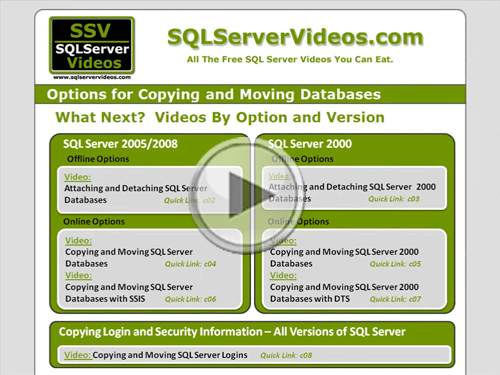
Then we’ll look at available options for moving and copying databases – and, as a part of reviewing those options, we’ll also look at the available how-to videos within this series that will guide you through whichever path you’ve chosen to take when it comes to copying and moving your databases.
In terms of copying or moving we mean either moving a database to another server, or creating a copy of an existing database on the current server – or out on a different server.
In either case though, what makes databases hard to either copy or move correctly really boils down to two things: File Access and Security.
So, let’s quickly take a look at both of these issues by way of an example.
And with this example, let’s suppose that within your company that someone has created an Excel spreadsheet that they want to use to track ideas on where the company picnic should be this year. And, then, let’s suppose that they’ve thrown this spreadsheet out on the network somewhere, and told people to open up that spreadsheet and update it with their preferences.
Other than the fact that this would be a dumb way to solicit user input, what many users would see when they tried to access this file would be a warning, telling them that someone else has it open for read/write access. And even though Excel will give these users the option to open the document in read-only fashion, they’ll still get a nasty error if they try to save any changes that they might make while the file is open by the other user.
That’s because, within most operating systems, it’s impossible for more than one user, process, or application to have a file open for write access at any given time.
To get around this, SQL Server acts as a proxy that interprets commands and instructions to read, modify, add, and delete data. And in this way, SQL Server, and SQL Server alone, ends up having access to the underlying data files – and end-users and applications don’t have to worry about file access and read-write vs. read-only restrictions.
Furthermore, since SQL Server is already acting as a proxy to control access to data, it also imposes a layer of security into the mix through the use of logins – which are used to specify which users and applications are able to ‘log in’ to the server. These logins, in turn, are then used either across the entire server or on a database by database basis to specify exactly what each login, or user, is able to do with existing structures and data.
As such, moving or copying a database to another server requires more than just a copy of the data files – as you also need to either move, copy, or recreate these logons and their security mappings in order for everything to work correctly.
Therefore, when it comes to moving and copying databases, there are a number of options available – though they really break down into two main groups: offline options and online options. Where, as you could guess from the name, some options can be done without interrupting service – while some approaches require you to take the target database offline.
With offline operations you either need to shut down SQL Server, or make it stop ‘serving’ your database files as a database. Then, once SQL Server’s ‘hooks’ are out of the files in question, they turn into normal operating system files that can be copied and moved as needed.
But, once you hook those files, or copies of them, up to another SQL Server through a process known as ‘attaching’, then those files end up turning into a database and will be controlled by SQL Server.
On the other hand, with online operations, instead of copying and moving the actual files that represent your database’s back-end data store, you just move around copies of your data – without interrupting service or access to your database.
And to move data around like this you can either use something like SQL Server Integration Services, or Data Transformation Services, to copy data, objects, and security information from one server to another. But drawbacks of this approach are that both servers in this operation will need to be able to ‘see’ each other, and, in my experience, these approaches tend to be fairly error prone.
As such, a better approach to take is to simply use backups as a way to copy databases from one server to another. And while using backups sounds intimidating if you’re not very familiar with SQL Server, they’re much easier to use than it sounds. In fact, using them is probably the EASIEST way to copy and move databases and it’s also one of the best ways to ensure success – so I strongly recommend using backups wherever possible.
And what makes backups such a viable option is the fact that backups are, in effect, copies of the data within your database. So, with a backup, all you have to do is restore it to a different server, or as a different database on the same server, and you’ll be set with a copy of your desired database.
However, No matter which approach you take, online or offline, you’ll also need to account for any logins and security mappings once your databases have been moved or copied. As such, each of the how-to videos listed here concludes with a reminder to copy these login and security details – which are all covered in the ‘Copying and Moving SQL Server Logins’ video that you’ll want to check out after you’ve copied and moved your databases.
So, with that in mind, we’re done with this video. Thanks for joining, and we look forward to seeing you in subsequent SQL Server videos.
- Comments
Do Not Redistribute
Please do not redistribute this content.
+ I Already Agreed - Stop Bugging Me
Non-Registered users must agree not to distribute each new time that they visit the site (prior to the first download per each visit or session on the site).
Registered users don't have to agree to terms each time they visit the site.
Registration costs nothing, is painless, and is evil-free™. And SQLServerVideos.com will never divulge your personal information to third parties. Ever.
Registered Users
Login Here
+ Terms of Service
By using this site and its resources, you agree to the following terms of use:
Redistribution is prohibited.
Redistribution of videos via any of the following means is prohibited:
• WebServer/HTTP, FTP
• YouTube and similar sites,
• BitTorrent and other P2P technologies,
• CD/DVD, Portable Hard-Drive, etc.
All Rights Reserved.
• SQLServerVideos' Parent Company, OverAchiever Productions, reserves all intellectual rights associated with this site and its content.
• OverAchiever Production reserves the right to prosecute or litigate copyright violations.
• As the copyright owner, OverAchiever Productions will also request information (from Google, YouTube, etc.) about anyone that posts copyrighted SSV
content to a video distribution site.

Great!!
Good Study Materials
Thanks
Dgmoss
good
I appreciate it.
Add A Comment