

Copying and Moving SQL Server Logins
 10
10
- Details
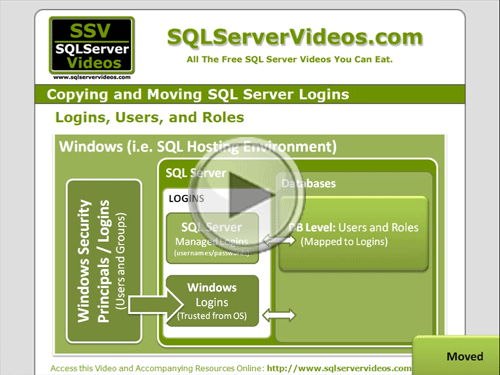
The final step in moving and copying SQL Server Databases is to make sure that your Logins are successfully mapped to database users and roles. In this video you'll therefore see what makes this requirement necessary and watch a step-by-step walkthrough of exactly what you need to do to ensure proper mappings between SQL Server Logins and database users and roles.
This Video Covers
Database Management, Logins, Security, Roles and Users.
Details
Video Length: 09:56
Skill Level: 200 - Intermediate
Series: Copying and Moving Databases
Author/Presenter: Michael K. Campbell
Applies to SQL Server: 2000, 2005, and 2008
Tags: Tips and Tricks, Administration, Concepts, and Security


- Downloads


+ Related Videos
Options for Copying and Moving Databases

Learn about technical considerations for moving and copying SQL Server databases, and learn about the videos and options available for copying and moving your own databases.
Covers: Database Management, File System and the SQL Server Storage Engine, Logins, Users and Roles and their impacts on copying and moving databases.
Skill Level: 000 - Overview
Video Length: 05:45
Release Date: 2008-10-20
Copying and Moving SQL Server Databases

Learn how to easily copy and move your SQL Server 2005 and 2008 databases using backups - which is much easier than you might think.
Covers: Database Management, SQL Server Management Studio, File System operations, and Administrative Tasks.
Skill Level: 100 - Beginner
Video Length: 10:05
Release Date: 2008-10-30
Attaching and Detaching SQL Server Databases

Learn the exact steps you'll need to take to successfully detach and attach SQL Server 2005 and 2008 databases in order to move or copy them.
Covers: SQL Server Management Studio, the SQL Server File System, and Database Management options required to attach and detach SQL Server 2005/2008 databases.
Skill Level: 100 - Beginner
Video Length: 10:33
Release Date: 2008-10-29
Understanding Backup Options
Learn about backup types, execution options, storage locations, and other options in order to best address your backup and recovery needs.
Covers: Backups, Recovery, Log Files, Storage Engine, and the SQL Server File System.
Skill Level: 000 - Overview
Video Length: 12:46
Release Date: 2008-01-03
+ Related Resources
SQL Server 2005 T-SQL Recipes A Problem-Solution Approach

Chapter 17 provides great info on Logins, and also provides information about fixing orphaned users as well.
Microsoft SQL Server 2005 Administrator's Pocket Consultant

Chapter 8 provides a great overview of SQL Server Principals, Authentication, and Authorization - along with practical advice and tips.
SQL Server Books Online
Information about Authentication Modes (SQL and Windows) can be found here:
Authentication Modes
SQL Server 2000
SQL Server 2008
Likewise, documentation for creating logins can be beneficial as well:
SQL Server 2000
SQL Server 2005
SQL Server 2008
Microsoft Help and Support

A number of KB articles available can be helpful when copying/moving SQL Server Logins, or when troubleshooting orphaned
users (starting with the two KB articles covered in this video):
KB 246133: Transfering Logins and Passwords
KB 918992: Transfering Logins and Passwords (SQL 2005/8)
KB 274188: Troubleshooting Orphaned Users
+ Transcript
NOTE: Accompanying timeline provides approximate correspondance only.
00:00
-
-
-
-
00:15
-
-
-
-
00:30
-
-
-
-
00:45
-
-
-
-
01:00
-
-
-
-
01:15
-
-
-
-
01:30
-
-
-
-
01:45
-
-
-
-
02:00
-
-
-
-
02:15
-
-
-
-
02:30
-
-
-
-
02:45
-
-
-
-
03:00
-
-
-
-
03:15
-
-
-
-
03:30
-
-
-
-
03:45
-
-
-
-
04:00
-
-
-
-
04:15
-
-
-
-
04:30
-
-
-
-
04:45
-
-
-
-
05:00
-
-
-
-
05:15
-
-
-
-
05:30
-
-
-
-
05:45
-
-
-
-
06:00
-
-
-
-
06:15
-
-
-
-
06:30
-
-
-
-
06:45
-
-
-
-
07:00
-
-
-
-
07:15
-
-
-
-
07:30
-
-
-
-
07:45
-
-
-
-
08:00
-
-
-
-
08:15
-
-
-
-
08:30
-
-
-
-
08:45
-
-
-
-
09:00
-
-
-
-
09:15
-
-
-
-
09:30
-
-
-
-
09:45
-
-
-
-
09:56
Hello and welcome to another SQL Server Video, my name is Michael Campbell and in this video we’re going to look at copying and moving SQL Server Logins from one server to another – along with making sure that those logins are correctly mapped to users and roles as needed.
And, if you’d like some background on why this is important – or if you’re looking for info on how to copy or move databases, then make sure to check out some of the other videos in this series.
Otherwise, let’s spend just a second or two covering why copying and moving logins is so important.
And to do that, we’ll start with a quick overview of some basics around the notion of logins – which are what SQL Server uses to control who or what can access a given SQL Server or ‘log in’ to it.
And what’s important to note about logins is that they represent a way to authenticate either an application or a user – typically in the form of making them provide a username and password.
With SQL Server, however, those authentication credentials can come from one of two places: either from Windows – which SQL Server trusts implicitly, or from SQL Server itself – meaning that SQL Server is responsible for managing and authenticating a username and password instead of merely relying upon Windows to validate the authentication of users and applications.
In turn, once logins are authenticated, they’re assigned permissions, or authorization, that define what these logins can or can’t do on the server. Then, in addition to defining system-wide permissions (such as the ability to create new databases or administer backups), logins can also be mapped to users or roles in individual databases – which define what a given login can or can’t do within a given database.
What’s important to note though, is that login information is stored on the server – while user and role information is stored in each database. As such, if you move or copy a database from one server to another, you’re typically going to lose the mapping between logins and users – resulting in what are known as orphaned users.
Therefore, in this video we’ll address the specific steps needed to address this problem using the following approach:
First, we’ll determine which logins we need to copy or move.
Second, we’ll look at scripting these logins with some code provided by Microsoft that will let us import these logins to a target destination server.
Third, we’ll quickly look at what you need to do to deal with Windows Logins – as their passwords or authentication details can’t be scripted by SQL Server.
Then we’ll conclude by looking at the process of recreating needed logins on the destination server and making sure that they’re correctly mapped to the users and roles in our transplanted databases.
So, with that order of operations in mind, let’s start by connecting to a server that I’ve already used as the source for copying a database in a previous video.
And, as you can see, I’m using SQL Server 2008 in this video, but the process that we’ll be following in this video will be pretty similar if you’re following along on SQL Server 2000 or SQL Server 2005 – and I’ll be sure to call out any key differences as needed.
Once logged in, I’ll open a new query against the database that I’ve already copied, and at this point we have two options for enumerating the logins we’ll need to account for from this database on the destination server.
First, we can run the special system stored procedure, sp_helplogins – which works on all versions of SQL Server – to get a list of all logins and their mapped users or roles on the entire server.
Or, if you’d like that information in a slightly easier to use format, you can download the code for this video from the code page for this video on the SSV site, and run a query that I’ve created in order to pull back sp_helplogins data for just the current database.
And, as you can see here, I’ve got three users that I’ll need to worry about with this database, two of which are SQL Server Logins, and the third is a Windows Login.
Now that we know which logins we need to address, we can take a look at KB article 918992 or 246133 to review an approach that will let us script logins from a source server for easy export to a destination server.
And, to spare you the horror of sorting through those KB articles, I’ll summarize the approach they outline, which is to give you some scripts you can use to create two new stored procedures on your source server in order to let you generate scripts for your logins which can be run on destination servers.
And one of the reasons that this KB article is so large – and spread, for all intents and purposes, across two different KB articles, is due to the fact that the syntax to create logins has changed a bit from one version of SQL Server to another. Therefore, determining exactly which of the scripts outlined in these KB articles to run depends upon two things:
First, the version of SQL Server on your source server, and second, the version of SQL Server on your destination server.
As such, you’ll want to pay careful attention to which script you grab from either of these KB.
To make things easier on you though, I’ve extracted these scripts into three different scripts that you can easily use by downloading the code that accompanies this video on the SSV web site.
Accordingly, since I’m going from a SQL Server 2008 server to another SQL Server 2008 server, I’ll just open up the files accompanying this video and use the corresponding script.
And to use it, first I’ll execute the part provided by Microsoft in order to create those two new special stored procedures, then I’ll go ahead and executed the sproc outlined in the KB article to generate the scripts for the logins on my source server.
And, as you can see, doing this generates a login creation script for EVERY login on my source server.
Given that you may not want to create all of these logins on your destination server, for obvious security reasons, you’ll typically want to go through the output of the sp_help_revlogin sproc to scrub out any logins that you don’t want migrated.
And, since I already enumerated the three logins that I need, I’ll just remove everything else, and you’ll likely want to take a similar approach in your own environment.
Another thing that you’ll want to do when manually reviewing these logins creation scripts is account for windows logins as well – as those logins will frequently be different from one server to another. So, for example, since my SQL15\WebApp user won’t exist on the server where I’ll be moving this login, I’ll want to manually change that to a principal and user that will exist. And, of course, the same thing goes for domain accounts – which you’ll also need to manually edit as well.
The bigger problem though, of course, is that since these are windows Logins, SQL Server isn’t able to script the ability to create these windows credentials on the target server – and, truthfully, we wouldn’t want that anyhow.
The point though, is that if I want my WebApp login to work on SQL16, I’ll need to go out and manually create that account BEFORE I run this script on SQL16.
And, by doing that, when I run this script, SQL Server will check with the security principal, SQL 16 in this case (or a domain controller if I were using a domain user), and make sure that the specified windows login exists.
If it does, then SQL Server will bind the specified windows user or group to this SQL Server login, and everything will work out as needed. Otherwise, this login creation will either throw an error, or – more typically – it will just fail silently.
Then, once these logins have been created on the destination server, running the special stored procedure, sp_change_users_login with the ‘report’ action, or option, will provide me with a list of any potential logins and their users or roles that may still be orphaned or non-mapped within my recently copied database.
Most of the time though, by creating the necessary logins on the destination server, SQL Server will go ahead and automatically re-map these logins to the necessary users and roles as needed – resulting in nothing being reported by the sp_change_users_login special stored procedure.
Of course, if you’re worried that you might be getting no results in error, you can always run the script we used in the first step in this video against your recently copied database as a way to verify that all logins, users, and roles have been correctly mapped within your destination database.
Otherwise, if logins do end up getting listed when you run this sproc, then you can run sp_change_users_login with different action parameters and additional details in order to fix any orphaned users that may still exist.
So, for example, by using the ‘Update_One’ action, you can link a specified user to an existing login – which is not only a great way to remap orphaned users, but it also gives you the option to map users against other logins if desired.
You can also use the ‘Auto_Fix’ action to address some other possibilities – including the ability to automatically create a login from the username specified, if you desire.
And, to get specifics on how to use these variants of sp_change_users_login should be called, you’ll want to check out books online for the specific version of SQL Server that you’re using on your destination server – though, hopefully, in most cases you won’t need to deal with this sproc as a way to re-map logins and users or roles.
And with that in mind, thanks for joining and we look forward to seeing you in subsequent SQL Server Videos as well.
- Comments
Do Not Redistribute
Please do not redistribute this content.
+ I Already Agreed - Stop Bugging Me
Non-Registered users must agree not to distribute each new time that they visit the site (prior to the first download per each visit or session on the site).
Registered users don't have to agree to terms each time they visit the site.
Registration costs nothing, is painless, and is evil-free™. And SQLServerVideos.com will never divulge your personal information to third parties. Ever.
Registered Users
Login Here
+ Terms of Service
By using this site and its resources, you agree to the following terms of use:
Redistribution is prohibited.
Redistribution of videos via any of the following means is prohibited:
• WebServer/HTTP, FTP
• YouTube and similar sites,
• BitTorrent and other P2P technologies,
• CD/DVD, Portable Hard-Drive, etc.
All Rights Reserved.
• SQLServerVideos' Parent Company, OverAchiever Productions, reserves all intellectual rights associated with this site and its content.
• OverAchiever Production reserves the right to prosecute or litigate copyright violations.
• As the copyright owner, OverAchiever Productions will also request information (from Google, YouTube, etc.) about anyone that posts copyrighted SSV
content to a video distribution site.

sql15\WebApp still is on the DB SSV_Copy as a User when you run the script for checking the users on the db
after the migration even if you created the login on the server you didn't associated the login with the user
how will this work?
The "Video Code" link above is correct, but the "Download Code" link to the right of the video when playing is wrong.
It linkes to "Code for Copying and Moving SQL Server Databases.zip" not "Code for Copying and Moving SQL Server Logins.zip".
Thanks
Code download should be fixed now.
the process does create the user but how do I make sure OLD passwords from 2005 is migrated over to 2008.
no matter what I do I receive the msg!
login faild for user 'xxx'
sername : nane
error number: 18456
sev: 14 state:1 line # 65536
@Aramazd,
Unfortunately it looks like you're running in to some other kind of problem or issue.
Specifically, looks like the login in question is actually DISABLED - because that's what State 1 typically implies.
Give this excellent troubleshooting guide a look - it should help you figure this out:
http://sqlblog.com/blogs/aaron_bertrand/archive/2011/01/14/sql-server-v-next-denali-additional-states-for-error-18456.aspx
Regards,
--Mike
Is "disabled" not accurate since the status is "enable" however I disabled and enabled to make sure same result .
Are you certain moving DB from 2005 to 2008 and attaching it with your login script works? How does the HASH value synch up with recovered and attached databases? I also tried same password on Source DB 2005 and it works
@Aramazd,
Yes - the whole point of the scripts in the downloads folder is to HELP synchronize the HASH (Security IDs, or SIDs) you're talking about.
Here's what you need to do. Either
a) Script logins from source server using the scripts provided. Then RUN those at the new/target server (one by one/etc - and checking to make sure the logins aren't defined as disabled).
IF you do that, then when you restore the database/attach it at the secondary and bring it on line, the recovery process will look for SIDs for users at the database level and then (if the SID exists as a viable login) it'll 100% map them.
On the other hand if you have NOT created the corresponding login on the new server, then the SIDs will NOT match up and the mapping will be busted and you'll have orphaned users.
At that point you can
b) Run spchangeusers_login as outlined in the sample scripts - also included in the download.
Long story short: either of those approaches WILL work. If you continue to run into problems AFTER checking for orphans and making sure there are none, then whatever problem you're bumping into is NOT a result of mapping logins to users and you're bumping into ANOTHER problem.
--Mike
Mike, thank you for responses but after all your hard work & documentation i am not seeing any issue why this process should or should not work.
-- from source
CREATE LOGIN [CAMRB2] WITH PASSWORD = 0x0100BC45101F57FF05D80DC12C066AC552AF0255250557C2F831 HASHED, SID = 0xF7D46571357D514083320D89A51DAFA2,
DEFAULTDATABASE = [MASTER],
CHECKPOLICY = OFF, CHECKEXPIRATION = OFF
-- went okay on new Target system … ( existing SQLSERVER 2008 R2)
Issued EXEC spchangeuserslogin 'Report' just in case
- no orphans found
- Attached DB and tried to login still same error !
- I may be able to change this particular user’s password however, not possible for 300-400 internal users.( I don’t know their passwords which the SSV reference page for this video if indicating to do next).
EXEC sp_changeuserslogin
@Action = 'Update_One',
@UserNamePattern = 'OrphanedUserHere',
@LoginName = 'LoginNameToMapToHere',
@Password = NULL
- OR optionally, you can also run:
EXEC sp_changeuserslogin
@Action = 'Auto_Fix',
@UserNamePattern = 'OrphanedUserHere',
@LoginName = NULL, -- create a new login based on user name
@Password = 'passwordHere!'
thank you anyway. i'll search some more
Mike ... okay it seems like "permission issue", if I grant sysadmin server role I am able to login if I remove I am not,
Even though I have verified other grant / privileges on this user!
Mike ... okay it seems like "permission issue", if I grant sysadmin server role I am able to login if I remove i am not!
Even though I have verified grants / privileges for this particular user... hope this helps
Add A Comment