

Nibbling Deletes
 6
6
- Details
Have large tables full of millions of rows where you need to delete data on a periodic basis without impacting write operations? Then check out this video which will show you how to tackle the problem using nibbling deletes.
This Video Covers
The SQL Server Storage Engine, and T-SQL tips and tricks.
Details
Video Length: 09:19
Skill Level: 300 - Advanced
Series: Tips and Tricks
Author/Presenter: Michael K. Campbell
Applies to SQL Server: 2000, 2005, and 2008
Tags: Best Practices, Maintenance, T-SQL, and Storage Engine


- Downloads


+ Related Videos
Extra-Wide Covering Indexes
Learn how to overcome the 900 byte limit for indexes in SQL Server.
Covers: Indexes, the SQL Server Storage Engine, and T-SQL tips and tricks.
Skill Level: 400 - Guru
Video Length: 07:55
Release Date: 2008-02-25
Ad-hoc Reporting
Learn how to easily export Query results to non-technical users using the tools you already have.
Covers: Reporting, Query Output, Query Analyzer, and SQL Server Management Studio.
Skill Level: 100 - Beginner
Video Length: 08:27
Release Date: 2007-03-10
Using SQL Server Templates
In this video you'll learn how to use, create, and manage SQL Server Templates.
Covers: Code Reuse, T-SQL, SSMS, Query Analyzer, and Code Management.
Skill Level: 200 - Intermediate
Video Length: 07:09
Release Date: 2008-10-08
+ Related Resources
Inside Microsoft SQL Server 2005: The Storage Engine

Chapter 8 provides an excellent overview of SQL Server Locking internals, and provides detailed information on how locks are acquired and escalated - along with details on lock compatibility and interactions.
Inside Microsoft SQL Server 2000

Chapter 9 provides specific details on how data is modified within SQL Server, and chapter 14 provides excellent information on locks, lock escalation, and lock compatibility.
SQLAdvice.com

For more information on Nibbling Deletes, check out a blog post I did a while back on how they work and how to use them.
SQL Server Books Online
The following T-SQL References from Books Online can help shed additional light on the topics covered in this video:
SET ROWCOUNT (SQL Server 2000 Only):
SQL Server 2000
TOP:
SQL Server 2005
SQL Server 2008
WAITFOR:
SQL Server 2000
SQL Server 2005
SQL Server 2008
+ Transcript
NOTE: Accompanying timeline provides approximate correspondance only.
00:00
-
-
-
-
00:15
-
-
-
-
00:30
-
-
-
-
00:45
-
-
-
-
01:00
-
-
-
-
01:15
-
-
-
-
01:30
-
-
-
-
01:45
-
-
-
-
02:00
-
-
-
-
02:15
-
-
-
-
02:30
-
-
-
-
02:45
-
-
-
-
03:00
-
-
-
-
03:15
-
-
-
-
03:30
-
-
-
-
03:45
-
-
-
-
04:00
-
-
-
-
04:15
-
-
-
-
04:30
-
-
-
-
04:45
-
-
-
-
05:00
-
-
-
-
05:15
-
-
-
-
05:30
-
-
-
-
05:45
-
-
-
-
06:00
-
-
-
-
06:15
-
-
-
-
06:30
-
-
-
-
06:45
-
-
-
-
07:00
-
-
-
-
07:15
-
-
-
-
07:30
-
-
-
-
07:45
-
-
-
-
08:00
-
-
-
-
08:15
-
-
-
-
08:30
-
-
-
-
08:45
-
-
-
-
09:00
-
-
-
-
09:15
-
-
-
-
09:19
Hello and welcome to another SQL Server Video. My name is Michael Campbell, and in this video we’ll look at ways to delete or archive large amounts of data from large tables – without negatively impacting performance on those tables while the deletes are being processed.
To get started, we’ll set the stage by examining the kinds of scenarios where such an operation would make sense. Then we’ll look at some sample code that demonstrates the technique that you’ll want to use, and conclude with some thoughts on advanced uses and considerations.
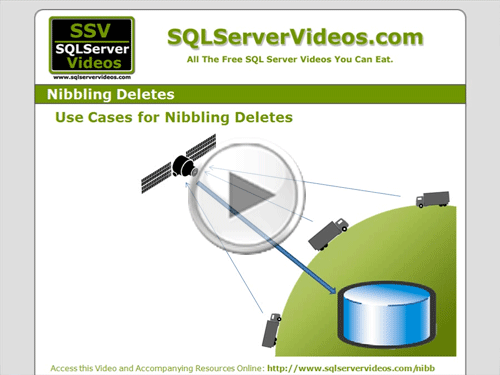
In terms of scenarios, or use-cases, image that you’ve got an application that routinely logs the GPS location and a few details about potentially thousands of package delivery trucks as they make their way around the world.
If you were using some sort of web service or proprietary front-end to this system, you’d likely need it to be able to record information sent in by trucks with very low latency – otherwise, your logging operations would quickly queue and you could run into problems.
And if you’re tracking multiple times per hour, against multiple targets, in multiple locations, that can quickly add up to a lot of logging information every hour, every day, and every month – to the point where you can easily end up with millions of records within a single month or even within a week.
So, if you only need to keep that data… say… for a few months, then you’ll want to periodically remove older information to free up space and keep performance as optimal as possible. But even if you need to keep this data for a longer period of time, you’ll likely want to archive older information into different tables or even databases on a regular basis to help make data retrieval operations a bit easier.
Now, if you take the normal approach and just fire off a query that deletes everything, say, over 60 days old, then what happens is SQL Server will go through the table, find all of the rows it needs to remove, and then proceed to make the changes by removing data from the affected pages and extents – along with updating indexes as needed.
On a really large table, this can quickly turn into a very expensive operation – as SQL Server will need to acquire an exclusive lock on the table to complete this operation. And while that exclusive lock is in play, other transactions will not be able to modify the table or add additional rows.
So, in our case, let’s assume that this entire operation is taking place on very high-end hardware, and we’re only going to end up nuking a few million rows. And let’s say that this entire operation ends up taking roughly 260 seconds.
And if that’s the case, then we’re looking at our table being locked, and inaccessible to new writes, for over 4 minutes.
SELECT operations can get around this problem using NOLOCK or READPAST table hints, but because DELETE operations require an exclusive lock, our writes will be blocked. And only once the DELETE operation completes, will those WRITE operations be permitted.
Therefore, what would be ideal, would be to take that 4+ minutes of requisite activity, and execute it in ‘bite sized’ chunks. That way our writes might still encounter some delays, but not enough to really block transactions, or cause timeouts in our applications.
Best of all though, our deletes are still going to be working, in a ‘nibbling’ fashion that lets us remove older table data without blocking input.
And with this approach, it’s very easy to define the size of the ‘chunks’ that you delete – as well as the amount of time between each chunk, in order to balance the need to delete data against the need to maintain concurrency.
Likewise, with this approach, it’s also very easy to introduce archiving operations that actually copy your data out to a different table or database before deleting it – as we’ll see in just a minute.
If we start off with an example of a ‘normal’ DELETE operation that we’d like to execute, we can see an example where we’re trying to delete all rows older than 2 months.
Executing this query, would, of course, introduce a large set of locks on our table.
But we can constrain this DELETE statement in a couple of ways.
First of all, if we’re using SQL Server 2000, we can use the SET ROWCOUNT option, and set it to something like 2000 – meaning that SQL Server will only execute the DELETE statement until it processes 2000 rows, then it’s done.
Of course, that syntax and option was removed in SQL Server 2005 and above – which is fine because the TOP operator now takes parameters – which makes nibbling deletes actually a bit cleaner, and easier to handle.
To take advantage of this functionality, we’ll just want to declare a variable specifying how many rows to delete – and I use a variable to make it tons easier to tweak and tune this script as needed to balance lock times.
Then, with that information handy, we can just tweak our DELETE statement a bit, by ensuring that we only pull the number of rows that our @count variable is set to – for deletion.
And what’s great about this approach – as opposed to merely using SET ROWCOUNT ON, is that we’re now actually spooling a lot fewer results to memory – which will help boost performance.
Of course, if we were to execute this query right now, we’d just end up deleting 2000 rows – which wouldn’t be bad, but it would only be a subset of the total number of rows, those that are older than 60 days, that we want to delete.
Therefore, to make sure that we delete all of the rows we want, we just need to fire this delete statement off, over and over again in a loop, until there are no more rows left to delete.
And to do that, we’ll start by declaring a variable that we’ll use to keep track of the number of DELETES that we’re processing through each iteration of the loop.
To make our loop, we’ll actually use a WHILE loop, which will keep processing as long as our rowcount equals the number of rows we’re limiting our operation to on each pass.
Then, to make sure that we don’t go into an infinite loop, we’ll make sure to assign our @rowcount variable to the number of rows affected with each DELETE operation – and once we grab less than the total we’re shooting for, our while loop will break or terminate, and the DELETE operation will be complete.
Now, if we ran this query right now, our nibbling DELETE operations would just run back to back. And what we’d likely find is that our DELETE operation would actually take longer to execute than just executing a standard DELETE statement.
And that’s because we’re forcing SQL Server to acquire locks over and over again – which is one side-effect of nibbling deletes that you’ll want to account for when using nibbling deletes. In most cases, especially where you’re using a SARGable argument to define which rows to remove, this overhead won’t be very large, but if you’re doing some heavy scans or joins, then this is something to take into consideration.
Otherwise, the problem with running our DELETE operations back to back is that we’ll still be blocking any other transactions that need to write to our table because we’re still just executing our DELETE operation in one big ‘gulp’.
So, to account for that, we’ll just throw in a ‘pause’ after each iteration of the loop, by using the T-SQL WAITFOR command, where, here, we’re causing SQL Server to just ‘chill’ for 4/10ths of a second before resuming operations.
And, by toggling the numbers of rows you’re deleting per ‘gulp’ and by tweaking the amount of time that you pause between each gulp, it’s possible to create nibbling delete operations that can carefully balance the need to remove large amounts of rows with the need to allow concurrent updates and changes to the table while deletions are being handled.
Of course, it’s also worth pointing out that you can use the approach outlined here for operations other than just DELETES – meaning that you could use it to handle large amounts of concurrent UPDATEs and so on.
Likewise, if you need to archive your data before deleting it from the table in question, you’ll just want to handle that operation here as well. Though, another approach you could take would be to copy all of the rows you intend to archive to their archival location BEFORE starting the nibbling delete process.
However, if you take this approach, just remember that the cut-off date that you’re using will likely fluctuate a good deal due to the length of that operation – so you’ll therefore likely want to use a variable to specify cut-off dates rather than just using a dynamically generated date – as going that route could get you into trouble by letting you duplicate or miss rows.
And that’s actually a good approach to take in most cases anyhow.
Otherwise, it’s also worth mentioning that if you’ve got CASCADE operations defined on the table you’re deleting, you’ll likely need to really seriously decrease the number of rows you’re processing at a time, as CASCADING deletes can frequently take a long time to process.
In fact, in my experience, you’re actually frequently much better off removing CASCADING deletes, processing them manually in the first part of your loop, and then removing parent records in the second part of the loop.
Of course, your mileage will vary based upon your own environment and needs – so feel free to leave any details about what works well (or not so well) in the comments section of the page for this video.
Otherwise, good luck with your own nibbling deletes and/or archiving operations, and we look forward to seeing you in subsequent videos.
- Comments
Do Not Redistribute
Please do not redistribute this content.
+ I Already Agreed - Stop Bugging Me
Non-Registered users must agree not to distribute each new time that they visit the site (prior to the first download per each visit or session on the site).
Registered users don't have to agree to terms each time they visit the site.
Registration costs nothing, is painless, and is evil-free™. And SQLServerVideos.com will never divulge your personal information to third parties. Ever.
Registered Users
Login Here
+ Terms of Service
By using this site and its resources, you agree to the following terms of use:
Redistribution is prohibited.
Redistribution of videos via any of the following means is prohibited:
• WebServer/HTTP, FTP
• YouTube and similar sites,
• BitTorrent and other P2P technologies,
• CD/DVD, Portable Hard-Drive, etc.
All Rights Reserved.
• SQLServerVideos' Parent Company, OverAchiever Productions, reserves all intellectual rights associated with this site and its content.
• OverAchiever Production reserves the right to prosecute or litigate copyright violations.
• As the copyright owner, OverAchiever Productions will also request information (from Google, YouTube, etc.) about anyone that posts copyrighted SSV
content to a video distribution site.

Nibbling Deletes. I did not see where you address space requirements when doing large deletes during a archive process. The Transaction Log can grow considerably if not backed up often enough so a addon to your code could include within the loop or another outside loop a step that takes a tlog backup every so often to keep the tlog in check. Can you give an example of this in your code example and video? Putting the db into SIMPLE recovery mode during this operation is not normally a good idea.
Great point - if you're deleting large amounts of data, the log file WILL grow quite a bit.
But rather than manually backing up your log file as part of this process, I'd recommend just ensuring that you're regularly backing up your log file, making sure you've got enough space to handle a larger operation, and then just keeping an eye on the operation as you go. (Start by making a small number of deletes until you've got a good feel for what kinds of log space this will require.)
And yes, switching your DB into SIMPLE Recovery would typically be a bad idea.
instead of using
DELETE FROM LorryLocations
WHERE locationId IN (
SELECT TOP (@count) locationId
FROM LorryLocations WITH(NOLOCK)
WHERE
[timestamp] < @cutoff
)
why not use
DELETE TOP(@count) FROM LorryLocations
WHERE [timestamp] < @cutoff
)
And instead taking log backup why not shrink the log file
Please correct me if i m wrong
Thanks
Hi Iam Prabhu from chennai,joined today in this forum... :)
Ya learn something new everaydy. It's true I guess!
Great video. I got it!. Useful and informative. Thank you very much this helped me solve an issue.
Add A Comment