

SQL Server Management Studio 2008
 11
11
- Details
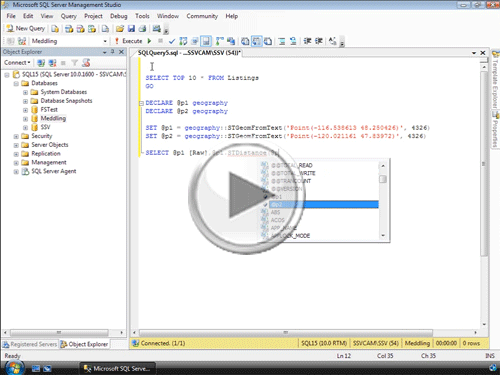
In this video you'll learn about new connection management features, the Object Explorer Details Window, IntelliSense, Debugging options, and ways to change and modify new SQL Server Management Studio 2008 options and preferences.
This Video Covers
SQL Server Management Studio, Connectivity Changes, and Query Output Options.
Details
Video Length: 10:42
Skill Level: 200 - Intermediate
Series: What's New in SQL Server 2008
Author/Presenter: Michael K. Campbell
Applies to SQL Server: 2008
Tags: Easy, Administration, Development, and SSMS


- Downloads

+ Related Videos
Introducing SQL Server 2008
Get a high-level overview of what's new in SQL Server 2008 for developers, dbas, analysts, and anyone using SQL Server 2008.
Covers: The SQL Server Storage Engine, New Data Types, Data Warehousing Improvements, Integration Services, and SSMS changes.
Skill Level: 000 - Overview
Video Length: 09:47
Release Date: 2008-11-04
Date and Time Data Types in SQL Server 2008
Learn about new SQL Server 2008 data types designed for larger and more precise date and time storage options.
Covers: T-SQL, SQL Server 2008, Date and Time, Data Type Precision, T-SQL Date and Time Functions.
Skill Level: 200 - Intermediate
Video Length: 08:54
Release Date: 2008-11-24
Backups with SQL Server Management Studio
Learn the ins and outs of manually executing backups for SQL Server 2005 and 2008 databases using SQL Server Management Studio.
Covers: Manual Backups, SQL Server Management Studio, Log File Management.
Skill Level: 100 - Beginner
Video Length: 09:49
Release Date: 2008-08-05
+ Transcript
NOTE: Accompanying timeline provides approximate correspondance only.
00:00
-
-
-
-
00:15
-
-
-
-
00:30
-
-
-
-
00:45
-
-
-
-
01:00
-
-
-
-
01:15
-
-
-
-
01:30
-
-
-
-
01:45
-
-
-
-
02:00
-
-
-
-
02:15
-
-
-
-
02:30
-
-
-
-
02:45
-
-
-
-
03:00
-
-
-
-
03:15
-
-
-
-
03:30
-
-
-
-
03:45
-
-
-
-
04:00
-
-
-
-
04:15
-
-
-
-
04:30
-
-
-
-
04:45
-
-
-
-
05:00
-
-
-
-
05:15
-
-
-
-
05:30
-
-
-
-
05:45
-
-
-
-
06:00
-
-
-
-
06:15
-
-
-
-
06:30
-
-
-
-
06:45
-
-
-
-
07:00
-
-
-
-
07:15
-
-
-
-
07:30
-
-
-
-
07:45
-
-
-
-
08:00
-
-
-
-
08:15
-
-
-
-
08:30
-
-
-
-
08:45
-
-
-
-
09:00
-
-
-
-
09:15
-
-
-
-
09:30
-
-
-
-
09:45
-
-
-
-
10:00
-
-
-
-
10:15
-
-
-
-
10:30
-
-
-
-
10:42
Hello and welcome to another SQL Server Video. My name is Michael Campbell and in this video we're going to review some of the new features and changes found in SQL Server Management Studio 2008.
Most of what we'll look at in this video represents great new additions and changes that will help make you more efficient and productive, but there are a couple of changes you'll want to watch out for as well - meaning that they'll take a bit of effort or understanding on your part in order to make them best work in your own environment.
So let's get started by looking at some of the new features or changes surrounding the management of connections. And while these are really subtle changes, I like the fact that there are now connect and disconnect icons for managing connections with the object explorer - in addition to the previous connect drop-down functionality that we had before.
In addition, there are also options we can toggle that are related to policy based management - which we'll look at in a future video.
And one of the cool benefits of policy based management is that you can now fire off a single query against multiple servers - and a bit later in this video we'll look at how you can control the options for how the results from those kinds of multi-server queries can be handled.
Another really cool thing that SQL Server Management Studio 2008 now provides is the ability to use a custom color in the status bar when connecting to your registered servers.
And while that may seem a bit lame at first blush, this can be a great way to give yourself some great visual cues about which server you're connected to at any given time. So, for example, I could easily set up connections to dev and testing servers with green or even default status bars and then use a red status bar on my production server to help remind myself that I'm in a production environment when working on queries and so on.
In addition to connection changes, there are also some great new UI changes that make it easier for users of SSMS to interact with their servers, databases and objects. And to access these, you just need to use the Object Explorer Details window.
To view the Object Explorer Details window, you can either launch it from the view menu, or just fire it up by pressing F7. Then, once it's enabled, it provides you with some great new data and information, or details, about whatever it is that you're currently looking at in the Object Explorer.
So, for example, when I'm looking at the databases node, it will show me detailed information on the databases on whatever server I'm currently looking at.
And, in addition to being able to drill-into your objects with this window, it also gives you the ability to specify which columns you'd like to see for each different type of object - and you can even resize and re-arrange these details around as needed.
And, what's great about this functionality is that it was done right - meaning that not only does it apply to other servers you might connect to, but it's saved as part of your user profile and the display of these details will be just how you left them when you fire up SQL Server Management Studio the next time.
In terms of UI functionality, another minor addition is the ability to search through your objects - using the search bar as a way to find objects such as views, tables, roles, and users.
There's also a new filter option as well - which is available both within the Object Explorer Details window as well as from within the toolbar on the Object Explorer itself.
Otherwise, in terms of added support and new features, there are a number of new additions and tweaks that can make management and interaction with SQL Server a bit easier.
For example, the contents of the management node have changed quite a bit - mostly to accommodate new data collection capabilities, policy based management, and configuration and interaction with the new Resource Governor.
Missing from this node though is Full Text Search - which has been fully integrated into the SQL Server engine, and the link to the Activity Monitor - which, in SQL Server 2005, didn't give you much more functionality than what you'd get by querying sp_who and other system procedures and catalogs.
Happily though, that's now changed significantly in SQL Server Management Studio 2008, where the activity monitor has been moved to the context menu for the server itself.
And, as you can see, once it gets fired up, it actually tracks much more than its predecessor and provides some great filtering capabilities and options that you can use to help track down potential bottlenecks or abusive spids.
Of course, when it comes to interacting with code and working with reports and queries, there are some great new benefits as well. Foremost among these is IntelliSense - which we've all been waiting for for a long time. And, sadly, while it does work pretty well, it doesn't work when you're connected with previous versions of SQL Server, and it also doesn't give you some of the capabilities you're used to if you're familiar with IntelliSense in Visual Studio - such as the ability to reformat code, or easily collapse and uncollapse regions through the use of keyboard shortcuts.
In other words, even though it's better than nothing, it's still missing some core functionality if you're a complete IntelliSense junkie - though it is possible to interact with the capabilities available by using the IntelliSense menu, or by using the associated menu shortcuts.
And one that you'll want to memorize is the option to refresh the cache as that's something you'll typically need to do when creating lots of new objects and code.
Otherwise, in addition to the benefits of IntelliSense, there are some really cool new features that we can use when designing or modifying queries - such as the ability to right click on our queries in the query editor and fire up SQL Server Profiler to watch the execution of our exact query - and nothing else.
Likewise, once the query has been executed, there's also a great new right-click option we can take advantage of in the results pane - which lets us copy data AND headers - something that was always a bit of a pain to deal with in SSMS 2005.
Then, as you can see here, since the query I executed involved spatial data types, there's also a new spatial results tab - which can be used to help visualize complex interactions with geometric and geographic data.
And, when working with XML in SQL Server Management Studio 2008, there are also some improvements for working with XML ShowPlans, and it's worth mentioning that Microsoft has also spent some time tuning the performance of the underlying queries being sent to SQL Server from SQL Server Management Studio 2008.
Now, as I mentioned earlier, there are also a couple of gotchas or things that you'll want to look out for and configure to specifically meet your needs.
The first of these is actually a really cool new bit of functionality - but one that might end up driving you nuts if you haven't trained yourself to press F5 to execute queries as the new little green arrow up here at the top of the query editor window sure looks like something you'd want to push if you're ready to run, or execute your query.
Of course, if you're familiar with Visual Studio, you're probably already thinking that this new button looks an awful lot like what you'd use to debug your code. And that's exactly what this new feature is designed to do.
And, of course, without some hefty firewall configuration, you're typically only going to want to use this bit of functionality on the server where you'll be executing your code, but this new feature does go a long way in letting you step into particularly complex sprocs or operations where multiple, nested, operations are going on - and we'll take a look at how to use this functionality in order to step-into our code in a subsequent video.
Otherwise, another new feature to watch out for is a great new addition that helps prevent the accidental loss of production data stemming from making schema changes with the designer before thinking through what those changes might entail. Of course, if you're competent and know what you're doing, calling this new addition a 'feature' is a bit like calling hand-cuffs a fun new accessory that goes with most outfits, so we'll show you how to turn this 'feature' off in just a few more minutes in case you'd actually like to be able to use the designer for schema changes.
Other options and features that you'll want to configure become apparent when I right-click on a table within the Object Explorer. In addition to some GREAT new options that now make it much easier to partition your tables, note that the 'open table' option has now been replaced with two new context menu options - one to select the top n rows, and another to edit a smaller subset of the table.
And, while I totally applaud these new changes as a way to hopefully stop people from doing dumb things on production servers - such as opening an entire table, I also feel that if you're dumb enough to open up an entire table in a production environment, then you probably shouldn't have access to the production environment.
So, in cases where you do know what you're doing, and when you don't feel like you need SQL Server Management Studio dictating how many rows you can edit or view at a time, feel free to rejoice in the fact that tweaking this functionality is very easy - and it's something you can do from within an entirely new options tab for the Object Explorer, where it's even possible to remove the top options entirely by specifying 0 as indicated by the tool tips.
And, if you remember earlier on, I mentioned that we could also control multi-server results - which is something that we can configure from the query results tab.
Likewise, I also mentioned that the option to prevent potential data loss from the modification of tables could also be toggled - and, as you can see, that's handled from the designers tab through the aptly named "prevent saving changes that require table re-creation" option.
And, since we're in here looking at new options and capabilities, it's nice that there's now, ironically, a new T-SQL entry in the Text Editor node where we can specify a limited set of options for IntelliSense and T-SQL formatting.
Likewise, there are also some cool new settings for the Editor Tab and the Status bar which can be used to help customize your own particular workflow with SQL Server Management Studio.
Otherwise, this has been a bit of a whirlwind tour of some of the new features and capabilities found within SQL Server Management Studio 2008, and there are a couple of things that I haven't covered - so make sure to check out the links associated with this video on the SSV site where I've got a link to a great write-up of new features provided by Paul Nielsen.
And, make sure to check out this video's series, "What's New in SQL Server 2008?" to see what other videos there are in this series, and to stay abreast of newly added and released videos on the SSV website, make sure to head out to updates.sqlservervideos.com and subscribe to the SSV RSS feed.
Otherwise, thanks for joining, and we look forward to seeing you in subsequent videos.
- Comments
Do Not Redistribute
Please do not redistribute this content.
+ I Already Agreed - Stop Bugging Me
Non-Registered users must agree not to distribute each new time that they visit the site (prior to the first download per each visit or session on the site).
Registered users don't have to agree to terms each time they visit the site.
Registration costs nothing, is painless, and is evil-free™. And SQLServerVideos.com will never divulge your personal information to third parties. Ever.
Registered Users
Login Here
+ Terms of Service
By using this site and its resources, you agree to the following terms of use:
Redistribution is prohibited.
Redistribution of videos via any of the following means is prohibited:
• WebServer/HTTP, FTP
• YouTube and similar sites,
• BitTorrent and other P2P technologies,
• CD/DVD, Portable Hard-Drive, etc.
All Rights Reserved.
• SQLServerVideos' Parent Company, OverAchiever Productions, reserves all intellectual rights associated with this site and its content.
• OverAchiever Production reserves the right to prosecute or litigate copyright violations.
• As the copyright owner, OverAchiever Productions will also request information (from Google, YouTube, etc.) about anyone that posts copyrighted SSV
content to a video distribution site.

Great video. Few comments
1. Demo little slower, you went way too faster, having an additional one or two minute added to the vedeo wont hurt. If need be please split the videos into multiple parts.
2. Please define the Level (100, 200, 300, 400) of the Video, that will help us set expectations
3. Keep the screen text little bigger, it was very hard to read some of the texts
This is the best site to learn new's features of SQL Server 2008!!!
Realy Thanks,
Paul
I thought the video speed was excellent. This video was exactly what I was looking for.
thanx
very helpful--and thank you for speaking briskly. it made me pay closer attention...
Very helpful :)
These videos are still quite valuable. Thanks for keeping them up on the Internet. 2008 is still a great release and may hang in there for some time to come since not everyone can afford the high cost upgrades.
DEMO IS A LITTLE BIT OF FASTER, AND WE NEED IT SLOW AND MORE DETAILS ASAP.
THank for good tutorials
Awesome job!
Awesome job!
Add A Comment